In the world of architecture, engineering, and construction, precise documentation isn’t just helpful: it’s essential. At the heart of this documentation ecosystem lies as built documentation, a critical resource created during and after construction. But what exactly are we talking about when we mention as built drawings, as built plans and as built blueprints? And how do professionals leverage these documents to effectively manage assets throughout their lifecycle?
This comprehensive guide explains these concepts, offering practical examples, and expert guidance on streamlining the process with innovative tools like Pagination.
Table of Contents
- Understanding As Built Documentation
- What Are As Built Drawings?
- Exploring the As Built Plan
- As Built Blueprints: From Field to Final File
- Benefits of Proper As Built Documentation
- How to Create High-Quality As Built Documentation
- How Pagination Can Help Automate As Built Documentation
Understanding As Built Documentation
Definition and Purpose
As built documentation represents the definitive collection of drawings and records that capture all modifications made during a construction project’s execution phase. Rather than showing how a structure was intended to be built, these documents reveal how it was actually constructed in reality.
These vital records typically include:
- Thoroughly updated as built plans
- Detailed markups highlighting changes to layout, dimensions, and systems
- Precise final locations of utilities, structural components, and materials
Why As Built Documentation Matters
Without comprehensive and accurate as built documentation, future renovations, routine maintenance, or compliance inspections become unnecessarily complicated and potentially dangerous. Various stakeholders depend on this information to:
- Prevent costly and time-consuming errors
- Enhance maintenance efficiency
- Meet regulatory requirements and safety standards
Who Uses It and When
From large-scale infrastructure developments to single-family homes, as built documents serve numerous industries. Key stakeholders include:
- Architects (informing future design decisions)
- Engineers (planning system modifications)
- Facility managers (coordinating ongoing maintenance)
- Government inspectors (verifying compliance)

What Are As Built Drawings?
Key Features of As Built Drawings
As built drawings provide meticulously detailed, scale-accurate representations of completed construction projects. They capture:
- Precise dimensions and spatial relationships
- Exact final positioning of all components
- Every deviation from the original design specifications
These updates typically reflect practical adjustments necessitated by unforeseen site conditions, evolving design requirements, or construction challenges encountered in the field.
Differences Between Design Drawings and As Builts
Design drawings are developed before any construction begins, serving as a visual representation of how the structure is intended to be built. They are based on the original design specifications and form the blueprint for project execution. In contrast, as built drawings are created after construction is complete. They reflect the actual built environment, capturing all modifications, field changes, and real-world adaptations made during the building process. While design drawings show the planned layout, as built drawings document the constructed reality.
Formats: Paper vs. Digital CAD Files
While traditional as built blueprints on paper still exist in many firms, digital CAD (Computer-Aided Design) formats have become the industry standard. Digital formats offer superior storage options, enhanced accuracy, and seamless integration with sophisticated Building Information Modeling (BIM) systems.
Exploring the As Built Plan
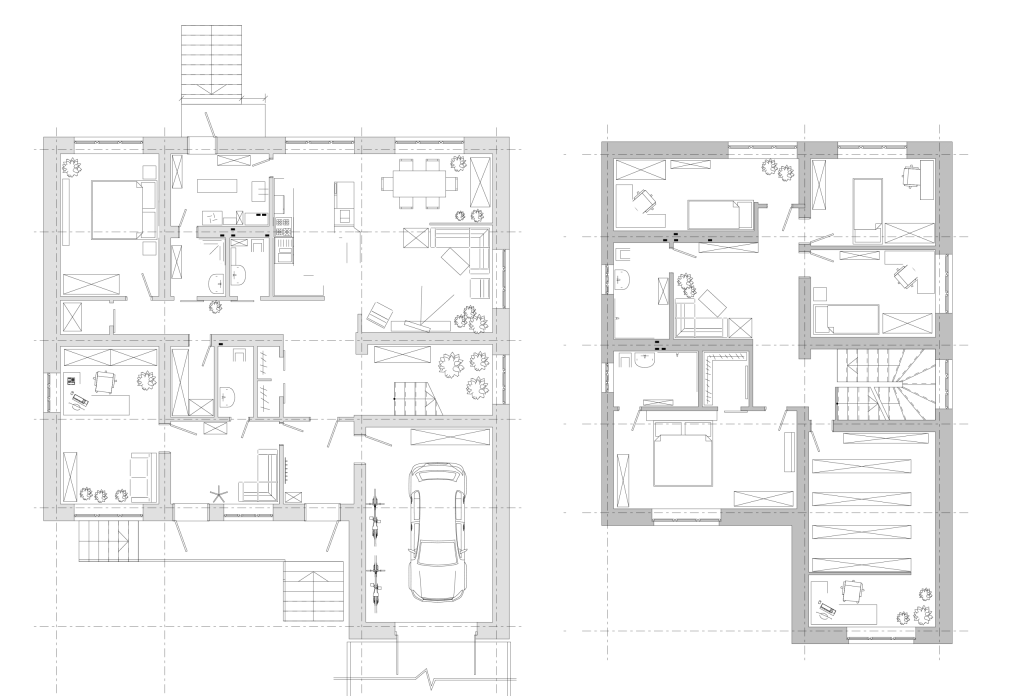
An as built plan serves as the comprehensive master document summarizing all elements of the completed structure. It typically encompasses:
- Detailed floor plans and elevation views
- Complete structural and MEP (Mechanical, Electrical, Plumbing) layouts
- Finalized landscape features and civil engineering elements
Examples by Industry
- Construction: Final positioning of HVAC systems and ductwork
- Architecture: Wall relocations implemented during on-site design refinements
- Civil Engineering: Critical adjustments to grade, slope, or drainage infrastructure
As Built Blueprints: From Field to Final File
Tools Used to Create As Built Blueprints
Today’s professionals employ a sophisticated blend of manual annotations, advanced laser scanning, drone technology, and mobile applications to gather field data. Specialized software then transforms this raw information into polished, accurate as built blueprints.
Best Practices for Accurate Blueprints
- Implement rigorous version control and timestamp all modifications
- Systematically verify field measurements against original design specifications
- Actively involve specialized subcontractors in the update process to minimize data gaps
Common Pitfalls to Avoid
- Overlooking seemingly minor changes (which accumulate significantly)
- Relying on outdated or inappropriate drawing templates
- Allowing communication breakdowns between design teams and field personnel
Benefits of Proper As Built Documentation
For Project Handover and Maintenance
Facility management teams require clear, current as built plans to ensure smooth operational transitions and efficient maintenance after construction completion.
Legal and Compliance Advantages
Regulatory authorities frequently require comprehensive as built documentation for permit approvals, safety inspections, and fire code certifications.
Enhanced Collaboration and Transparency
With reliable, precise records in hand, all project stakeholders can make confident, informed decisions, significantly reducing risk while boosting operational efficiency.
How to Create High-Quality As Built Documentation
Step-by-Step Workflow
- Track Changes: Systematically document all deviations during active construction
- Verify Field Conditions: Carefully measure and validate all updates
- Update Drawings: Accurately incorporate changes into original CAD/BIM files
- Review & Approve: Secure formal sign-off from project engineers or supervisors
- Distribute & Archive: Deliver final versions in appropriate digital and/or physical formats
Streamlining updates is also simpler when you visualize process workflows. Leveraging an AI-powered flowchart creator can help teams rapidly map out revision cycles or approval pathways, ensuring that documentation changes are accurate and easily auditable throughout the as built update process.
Software Tools and Technology
- AutoCAD and Revit for professional drafting and modeling
- Advanced point cloud scanners for capturing precise field conditions
- Cloud-based collaboration platforms for seamless version control
How Pagination Can Help Automate As Built Documentation
Creating and maintaining comprehensive as built documentation often becomes labor-intensive and error-prone, particularly when managing complex projects with hundreds of documents. This is precisely where Pagination delivers exceptional value.
What is Pagination?
Pagination offers a powerful cloud-based platform that automates the production of structured documents including:
- Comprehensive technical manuals
- Professional-grade blueprints
- Detailed product catalogs
- Complete as built plans
By seamlessly integrating your existing data sources (Excel, ERP, BIM, etc.), Pagination generates up-to-the-minute as built drawings and documentation in seconds, ready for immediate stakeholder distribution or secure compliance archiving. You can automatically integrate your as-built drawings in the chosen layout with all the information you need.
Discover how Pagination can transform your technical documentation workflows
Final Thoughts
Whether you’re overseeing a soaring skyscraper or managing a modest residential development, comprehensive as built documentation remains fundamental to long-term project success. In fact, many firms choose to hire remote worker specialists to handle detailed as built drawings and comprehensive plans, ensuring accuracy without increasing on-site overhead. From precise blueprints to meticulous records, this approach helps ensure compliance, minimize risk, and prepare confidently for future modifications.
And with innovative tools like Pagination, the previously tedious task of document updating becomes remarkably straightforward, efficient, and scalable.
FAQs: Quick Answers to Common Questions
What are as built drawings in construction?
As built drawings provide a precise visual record of a construction project’s final condition, reflecting all field changes and deviations from the original design intent.
Why are as built documents important?
They serve as an indispensable reference for future modifications, regulatory inspections, legal compliance verification, and effective facility management.
What is included in an as built plan?
A comprehensive as built plan incorporates detailed layouts, accurate elevations, final system placements (including HVAC, electrical, and plumbing), and all modified dimensions and materials.
Who prepares as built drawings?
Typically, site contractors, project engineers, or field supervisors document changes, which are then compiled and finalized by professional drafting teams or document control specialists.
What is the difference between redlines and as builts?
Redlines represent preliminary field markups of changes made during construction, while as builts constitute the finalized, professional version of these modifications.
Can as built documentation be automated?
Absolutely, innovative platforms like Pagination streamline document creation by synchronizing seamlessly with your design files and construction data sources.