Even in our digital age, a well-designed brochure remains one of the most effective marketing tools. Unlike fleeting online ads, brochures provide a physical connection with your audience: something they can touch, keep, and return to. This guide covers everything you need to know about creating powerful brochures, from choosing the right format and paper to crafting content that drives action. Follow these principles to design brochures that don’t just look great but actually help grow your business.
Table of Contents
- What Is a Brochure and Why It Still Matters in 2025
- Types and Kinds of Brochures
- Typical Brochure Sizes and Dimensions
- What Should a Brochure Include?
- How to Print a Brochure
- Brochure Paper Weight and Types
What Is a Brochure and Why It Still Matters in 2025
Imagine walking into a conference with nothing but your smile and a business card. Now picture yourself armed with a beautifully designed brochure that tells your story at a glance. That’s the power of a well-crafted brochure: it speaks for you even when you’re not there.
A brochure is essentially a printed marketing document that showcases your company, product, or service. Unlike its simpler cousin, the flyer (which is just a single unfolded page), it offers multiple panels through strategic folding, creating more space for your story to unfold (literally and figuratively). Alongside catalogs, price lists, and flyers, brochures remain one of the most essential marketing collateral pieces for businesses of all sizes.
In our increasingly digital world, you might wonder if brochures are still relevant. The answer is a resounding yes! They provide something digital content often can’t: a tangible, physical connection with your audience. Many successful businesses now combine traditional print brochures with digital alternatives like interactive PDFs and flipbooks to create a comprehensive marketing approach that reaches customers through multiple channels. According to a study, 20% of US consumers still prefer to receive their mail in a brochure format.
To get started, you can find some brochure templates here.
Types and Kinds of Brochures
Choosing the right format can make all the difference in how your message is received. Here are the most popular types you’ll encounter:
- Trifold: Features three vertical panels that create a compact yet information-rich document
- Bifold: Simply folded in half, offering an excellent canvas for storytelling and product overviews
- Z-Fold: Contains three panels that unfold in a Z-shape, perfect for explaining processes or timelines
- Gatefold: Panels open outward like gates, creating dramatic reveals for high-impact visuals

Beyond physical format, they can also be classified by their purpose:
- Sales brochure: Focused on converting prospects into customers
- Campaign brochure: Supporting political campaigns, product launches, or awareness initiatives
- Company profile brochure: Telling your organization’s story and highlighting its values
- Event brochure: Providing essential information about conferences, exhibitions, or gatherings
Typical Brochure Sizes and Dimensions
Before diving into design, you’ll need to decide on the right size for your brochure. The typical dimensions that professionals use include:
- 8.5″ x 11″ (US Letter): The standard size throughout North America, offering familiarity and ease of use
- A4 (210 x 297 mm): The international standard used widely across Europe and many other countries
- 8.5″ x 14″: Provides additional space, making it ideal for content-heavy trifold brochures
When creating printable brochure paper for home or office use, sticking with standard formats like A4 or Letter ensures compatibility with most printers. For professional format PDFs, remember to include crop marks and bleed areas for clean printing.

What Should a Brochure Include?
Compelling Headline
Start with an attention-grabbing headline that clearly communicates your main benefit or message. Use action verbs to create curiosity or urgency. Example: ”Transform Your Business with Our Cutting-Edge Software Solutions”. Also the font you use is important, here you can find a guide for the best fonts for brochures and flyers.
Subheading
Follow with a brief subheading that elaborates on your headline or clarifies your offer. This guides readers deeper into your content without overwhelming them.

Visuals
High-quality images and graphics should be central to your brochure design. They engage readers visually and often communicate more effectively than text alone. Choose visuals or branded photographs that align with your brand identity: clean and modern for tech companies, warm and inviting for hospitality businesses. Check our guide on how to make user friendly catalogs to find more tips.

Value Proposition
Clearly explain what makes your product or service unique, focusing on benefits that address your readers’ specific needs. Example: ”Our software reduces processing time by 50%, allowing you to focus on what matters most—growing your business.”
Call to Action (CTA)
Include a clear, prominent instruction that guides readers on what to do next. Whether it’s making a purchase, scheduling a demo, or visiting your website, your CTA should stand out. Example: ”Call Now to Schedule Your Free Consultation!” or ”Visit www.site to Get Started Today!”

Contact Information
Always include easy-to-find contact details – phone number, website, email, and social media profiles. Use icons for visual clarity and quick reference.

Company Overview or About Us
A brief description of your company or product will help build trust with the reader. Make sure this is concise and focuses on what sets your business apart from the competition.
Example: ”For over 20 years, Example Co. has been a leader in providing innovative software solutions for small businesses.”
Keep it customer-centric by focusing on how your company meets the needs of your target audience, rather than detailing your entire company history.
Social Proof or Testimonials
Including reviews or testimonials from satisfied customers adds credibility and trustworthiness to your brochure. People are more likely to trust a product or service that others have already used and recommend.
”This software has cut our workflow time in half, and our productivity has skyrocketed!” – Sarah M., Small Business Owner
Use real quotes with customer names and positions, if possible. This helps add authenticity to the testimonial.
Special Offers or Promotions
If you have any limited-time offers or discounts, make them prominent in your brochure. This creates urgency and incentivizes readers to act quickly.
Example: ”Get 10% off your first order- limited time offer!”
Highlight these offers with a bold box or contrasting color to make them stand out.
Branding and Design Consistency
Ensure that the design and branding of the brochure reflect your company’s identity. This includes logo placement, color scheme, and font choices that align with your website and other marketing materials. Consistency across all marketing materials strengthens your brand recognition and keeps your message cohesive.
White Space
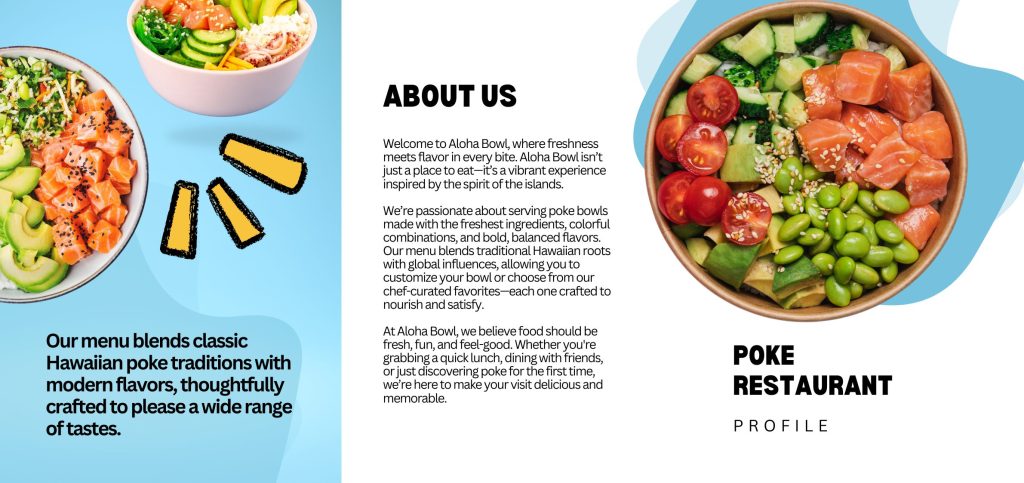
Don’t overcrowd your brochure with text or images. White space is essential for readability and overall visual appeal. It ensures that key information stands out and doesn’t overwhelm the reader. Balance text and images with sufficient margin space, and leave room between sections. This makes it easier for readers to absorb information. You can read more about white space distribution here.
How to Print a Brochure
Once you’ve perfected your design, it’s time to bring your brochure to life. For professional-quality documents, consulting with a local print shop is often your best bet. However, if you’re printing in-house, here’s how to get it right:
1. File Preparation
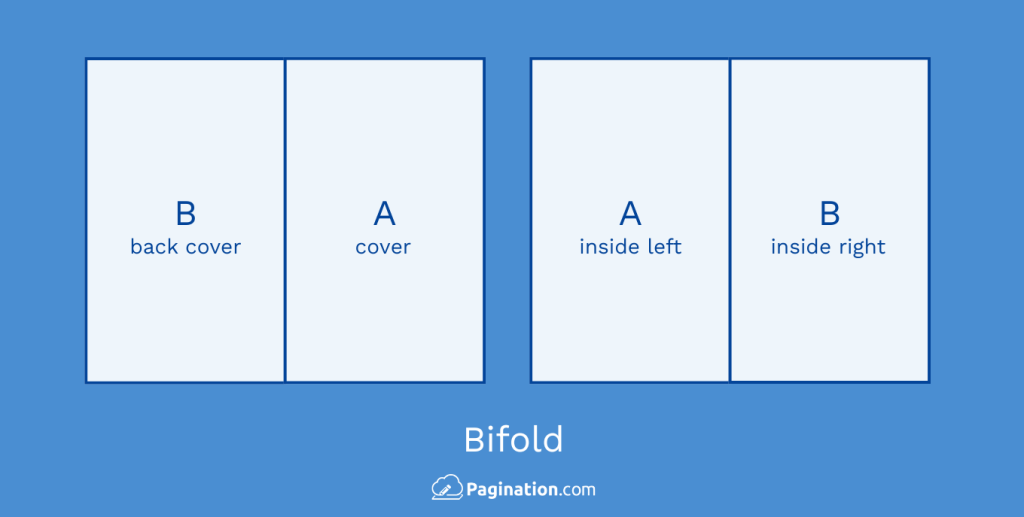
Proper file preparation is the foundation of successful brochure printing. For bifold brochures, you’ll be working with a simple structure featuring one central fold that creates two panels on each side. The layout typically places the cover and back cover on the first page, with the inside left and right panels on the second page.
Trifold brochures are slightly more complex, with two folds creating three panels per side (six panels total). When designing your trifold layout, remember that the outside panels should feature your right panel, back cover, and front cover, while the inside contains your inside left, center, and right panels in that order.

Regardless of which format you choose, stick to standard paper sizes like A4 or US Letter for the best results. Keep your margins at least 0.5 cm per side unless your printer supports borderless printing, since it prevents important content from being cut off during printing or folding.
2. Printing the File
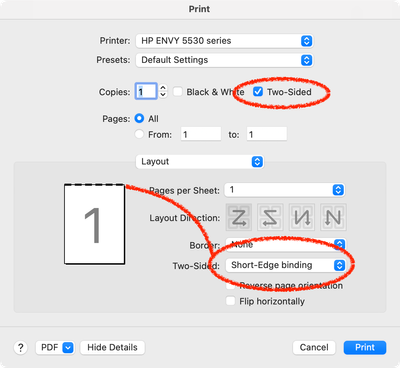
When you’re ready to print, open your brochure file (whether created in PDF or InDesign format) and select the double-sided printing option, also known as duplex printing. For trifold brochures, select ”Flip on short edge,” while bifold designs work better with the ”Flip on long edge” setting.
Proper alignment is crucial for professional results, so always print a test copy before committing to your entire print run. This allows you to check that the back isn’t upside down relative to the front and that all elements align properly. If your printer doesn’t support automatic double-sided printing, don’t worry: simply print all front sides first, then carefully reinsert the paper head-first to print the back sides.
3. Folding
Folding might seem straightforward, but proper technique makes all the difference in your final product. For bifold brochures, fold the paper evenly in half, using a folding tool, ruler, or bone folder to create a crisp, professional edge rather than a rounded, amateurish crease.
Trifold brochures offer two folding options: the ”Z-fold” with alternating folds or the ”letter fold” where the inside panel folds first. Whichever method you choose, here’s a professional tip: make the inside fold panel slightly narrower (by about 1-2 mm) than the others to prevent bulging when the brochure is fully folded.
By following these printing and folding techniques, you’ll create brochures that look professionally produced, even when working with basic office equipment. The key is attention to detail at every stage of the process, from file preparation through the final fold.
Brochure Mailing
When planning brochure mailing campaigns, stick to standard sizes to minimize postal costs. Keep folds precise and avoid non-machinable formats that might incur surcharges. Adding dedicated mailing panels to the back can streamline bulk mailing processes.
Printing Costs for Brochures
The printing costs for brochures vary based on several factors:
- Quantity (bulk orders typically reduce per-unit cost)
- Paper weight and finish (premium options cost more)
- Color printing vs. black and white
- Number and complexity of folds
You can expect to pay between $0.10-$1.00 per piece for standard brochures, while premium options with special finishes might cost $2-$5 each.
Brochure Paper Weight and Types
The right paper choice affects both the feel and durability of your brochure. Common brochure paper weights include:
- Text Weight (50-70 lb): Lighter options perfect for cost-effective brochures that need to remain thin, such as mailers or handouts
- Cover Weight (80-100 lb): Provides sturdiness and a professional feel, making it ideal for marketing materials and retail brochures
- Glossy Paper (80-100 lb): Adds shine and makes colors pop, particularly effective for travel brochures or luxury product showcases
Paper finishes also contribute significantly to the overall impression:
- Glossy Coated: Enhances color vibrancy and creates visual impact, perfect for image-heavy brochures in industries like travel, retail, or real estate
- Matte Paper: Offers a more sophisticated, understated finish that’s easier to write on, ideal for corporate brochures, professional services, or non-profits
- Uncoated Paper: Provides a natural, textured feel with a softer finish, well-suited for eco-friendly brands or artistic presentations