Table of Contents
- How To Automate Label Printing Via RESTful API
- Why Standard Label Software Fails
- Headless Label Generation API for B2B Portals, ERP, PIM, and Warehouse Systems
- Product Label Automation via API: Speed, Typography, QR Codes
- How to Automate Label Printing without Hardware
- Getting Started with the Label Generation API
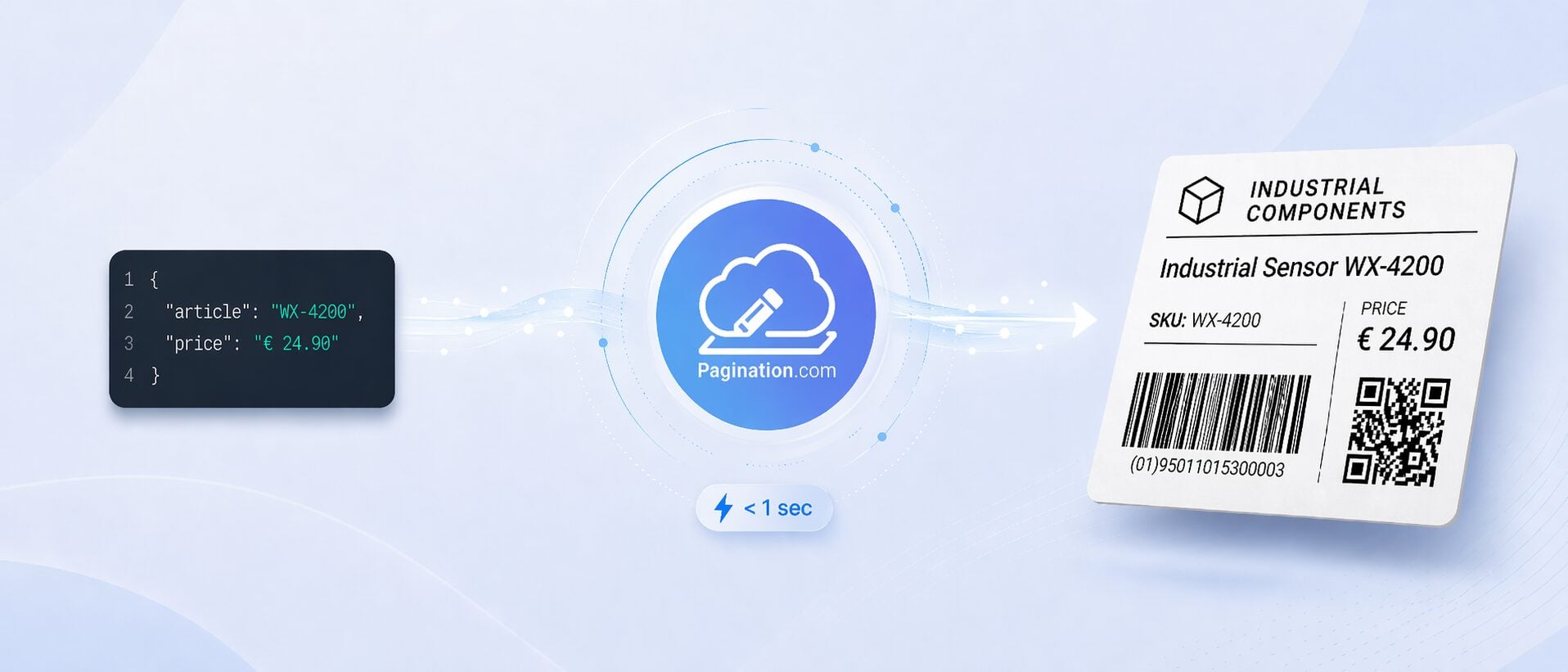
Generating product labels with barcodes and QR codes shouldn’t require a designer, a dedicated application, or a five-step manual workflow. It should be one API call: data in, print-ready PDF out, in under one second.
That’s what Pagination’s label generation service does. Your platform sends product data via RESTful API. Pagination renders a professionally typeset label through Adobe InDesign Server and returns a PDF ready for print, download, or display.
The same InDesign-based infrastructure already powers product catalogs automation, price lists automation, and various types of documents for companies across electronics manufacturing, building materials, and wholesale distribution. The label generation API applies that same engine to real-time, single-document delivery.
How To Automate Label Printing Via RESTful API
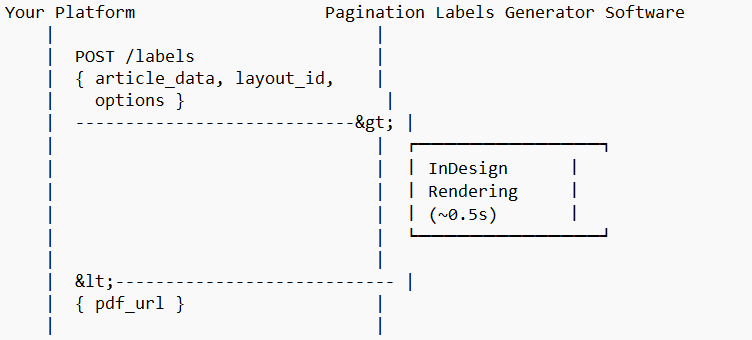
- You send article data (JSON or XML), the layout ID, and customization options (price display, image toggle, barcode/QR code type),
- Pagination renders the label through a pre-configured InDesign template built to your brand guidelines,
- You receive a URL to the print-ready PDF or a binary blob, your choice.
The entire round-trip takes under one second for a single label. That’s what makes this an API for label printing that can live inside a checkout flow, a warehouse pick screen, or an ERP export routine.
Why Standard Label Software Fails
Most label generation software falls into two camps:
- Code-based PDF libraries (Java, JavaScript, Python): fast but limited. Text overflows, no hyphenation, no real typographic control. Every layout change requires a developer.
- Manual design workflows: beautiful but slow. A designer opens InDesign, places data, exports. It doesn’t scale. It can’t be embedded in a checkout flow or a warehouse system.
The label generation via API eliminates the trade-off. You get InDesign’s typographic engine at API speed, true product label automation.
| PDF Library | API Label Generation Software | |
|---|---|---|
| Response time | Fast | < 1 second |
| Typography | Basic | Professional (InDesign) |
| Layout changes | Developer | Designer edits InDesign template |
| Scale | Unlimited | Unlimited |
| Print quality (CMYK, vectors) | Rare | Print-ready |
| API integration | Yes | Yes, RESTful |
| QR code / barcode generation | Library-dependent | Built-in, print-optimized |
Headless Label Generation API for B2B Portals, ERP, PIM, and Warehouse Systems
Pagination’s label generation service runs behind your interface. Your users click a button in your web shop, your portal, your WMS and get a PDF. They never see Pagination. No « powered by », no redirect, no external branding.
You own the experience. Pagination provides the engine.
- Labels carry your logo, your fonts, your color scheme,
- InDesign templates are designed to your specifications,
- The API endpoint lives behind your authentication and your domain,
- Your design team controls how labels look; your developers control when they’re generated.
This is what headless label generation means in practice: the rendering engine is decoupled from the interface. You decide where, when, and how labels appear, exactly as Pagination’s clients do with price books software and multi-region catalogs software.
Product Label Automation via API: Speed, Typography, QR Codes
Sub-second rendering
The first label request of the day is as fast as the thousandth. There is no boot-up time, no queue, no initialization delay. Pagination keeps at least one InDesign Server instance warm at all times, so when your user clicks « print label, » the rendering engine is already running and the response is on its way.
| Scenario | Response Time |
|---|---|
| Single label | ~0.5 seconds |
| 10 labels in parallel | < 1 second each |
| Large batch (50+) | Scales horizontally |
InDesign-Quality Typography in Every Label
This is what separates InDesign from a PDF library and the reason generic label creation software can’t compete on print quality:
- Product titles truncate gracefully with ellipsis after a configurable number of lines,
- Article codes auto-shrink the font when they exceed a character threshold,
- Prices reposition dynamically based on available space,
- Hyphenation uses InDesign’s dictionary engine (40+ languages),
- Decimal and currency formatting adapts to locale automatically, the same locale-aware engine that powers catalog automation. See for example how a global industrial weighing manufacturer standardized multi-regional catalog production.
- Vector logos inserted as reusable instructions, crisp at any print scale.
Flexible Label Layouts with InDesign Templates
Each layout is an InDesign template. Designers edit layouts in InDesign. Developers never touch them. Layouts support:
- Conditional elements: show/hide images, prices, barcodes, descriptions
- Price display options: net, gross, with/without VAT, multi-currency
- Multiple formats: single labels, multi-up sheets (2×4, 3×5), shelf tags, shipping labels
New layouts take 3-4 days to set up. Your existing labels serve as the design reference.
Built-in QR Code and Barcode Label Generation
No need for separate QR code label software or barcode generation libraries. The API creates print-optimized codes directly inside the label: Code 128 barcodes from article numbers, QR codes with product URLs, inventory codes, or custom data, and EAN/UPC for retail environments.
High-volume codes are pre-generated in batch; long-tail codes are created on-the-fly and cached. Every code is vector-based, no pixelation at any scale.
How to Automate Label Printing without Hardware
If you’re looking for how to automate label printing without investing in physical hardware or label printer software, the API label generator software provides a different path: generate the print-ready PDF programmatically, then print it on whatever device you already have.
Your system sends data, receives a PDF, and decides what to do with it; display it, print it, archive it, email it.
This is especially relevant if you currently generate labels from Excel or CSV files through manual workflows. One API call replaces a multi-step process.
Generate Labels from Excel? There’s a Better Way
Here’s how a manual Excel-based label workflow compares to label generation via API, step by step:
| Manual (Excel / Word / Template) | Label Generation via API | |
|---|---|---|
| Trigger | Human opens file | API call from your system |
| Data source | Copy-paste or mail merge | JSON/XML from PIM, ERP, or database |
| Layout control | Template + manual adjustments | InDesign template, automatic |
| Output | Screen-quality PDF | Print-ready PDF (CMYK, vectors) |
| Time per label | Minutes | < 1 second |
| Barcodes / QR codes | Separate tool or plugin | Built-in |
Getting Started with the Label Generation API
The automation of label production runs on AWS infrastructure (EU-hosted, GDPR-compliant) with Dockerized InDesign instances that scale horizontally, configurable concurrency (10+ parallel processes), and a 99.9% uptime SLA.
1. Share a sample label and your data structure
Send a current label PDF or InDesign file, your data sample, and your expected workflow.
2. Define the layout and business rules
Pagination configures the template logic for optional elements, price handling, barcode rules, QR code content, and output variants.
3. Connect your platform to the API
Your team receives endpoint documentation and credentials for integration.
4. Test with real data
You validate layout quality, expected behavior, and performance with realistic requests.
5. Go live with the production setup
The service is deployed according to the agreed usage profile and workflow requirements.
Request a Demo of the Product Label Generation API
Creating a product label should be as simple as sending an API call. If you would like to see how this could work with your own data, share a sample label and your target workflow, and Pagination will evaluate the best solution for your use case.