How to Turn Digital Product Passport Data into Documents
Register and Download
With Digital Product Passport requirements taking effect, product data is no longer just operational, it becomes regulated.
Documentation must reflect that data consistently, and updates must be traceable across all outputs. Companies that still rely on manual document creation will struggle to keep up.
The issue is not InDesign. It is the absence of a document automation layer between product data and final output.
What Is the Digital Product Passport?
The digital product passport is a new EU-driven framework that requires companies to collect, structure, and share detailed product data across the entire lifecycle.
This includes:
- materials and composition
- environmental impact
- certifications and compliance
- repairability and lifecycle information
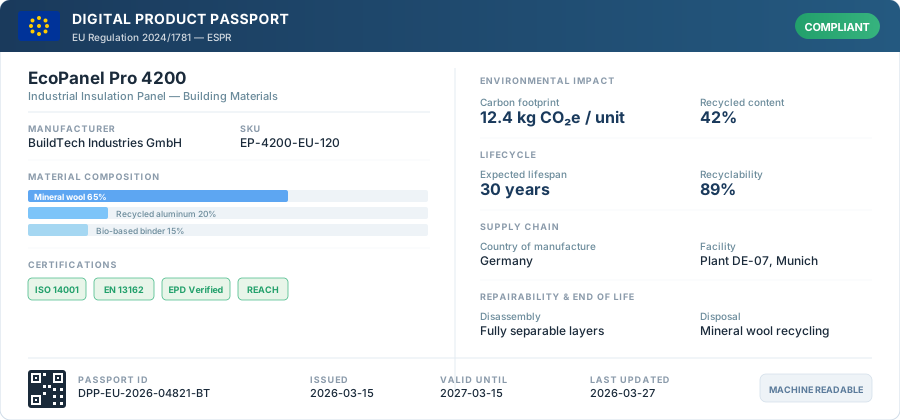
The data is typically stored in structured systems (PIM, ERP, PLM) and made accessible through QR codes or digital interfaces.
But while the digital product passport defines how data is structured and accessed, it does not define how that data becomes usable in documents, datasheets, catalogs, price lists, technical specs. That gap is exactly what Pagination fills.
What a DPP Documentation Workflow Looks Like
A scalable digital product passport documentation workflow is structured in three layers.
Most companies invest heavily in the first two. The third is where the gap usually appears.
| Layer | What it does | Systems involved | Status in most companies |
|---|---|---|---|
| Data Layer | Stores and maintains product data: materials, certifications, compliance attributes, descriptions, pricing | PIM, ERP, PLM | Well understood, actively managed |
| DPP Layer | Structures data for regulatory compliance, makes it traceable and accessible through QR codes or digital interfaces | DPP platforms, compliance tools | Increasingly adopted |
| Document Layer | Transforms structured data into the outputs customers actually see: datasheets, catalogs, price lists, technical docs | Pagination | Underinvested, often manual |
The data layer is the single source of truth. The DPP layer makes it compliant. Pagination takes it from there and generates every document your customers, distributors, and regulators need to see.
What Actually Changes with a DPP Document Layer
Introducing Pagination as your document automation layer changes how your organization reacts to updates, regulations, and market needs.
| Manual workflow | With Pagination | |
|---|---|---|
| Trigger | Product manager notices a change | Data update in PIM triggers document regeneration |
| Document creation | Layout rebuilt manually in InDesign | Template pulls data automatically |
| Multi-language | Separate file per language, maintained individually | All language versions generated from a single data source |
| Time to update | Days to weeks | Minutes |
| Consistency | Depends on who did it and when | Every document reflects the same data, every time |
| Compliance risk | High: documents can lag behind data changes | Low: documents and data stay in sync |
When managing thousands of SKUs across multiple markets, manual workflows are not just inefficient. They become a compliance risk.
From Digital Product Passport Data to PDF Automatically
A scalable workflow connects structured product data directly to document generation:
PIM / ERP → structured DPP data → document automation → InDesign + PDF outputs
With this approach:
- you generate documents from digital product passport data automatically;
- every output reflects the latest compliant information;
- updates propagate across all documents automatically;
- multi-language and multi-market versions are handled centrally.
This is digital product passport document automation in practice.
Ready to Automate Your DPP Documentation Workflow
If you are preparing for Digital Product Passport, the key question is not just “Where do we store our data?”, it is “How do we turn that data into documents at scale?”
Pagination connects to your existing data sources: PIM, ERP, or Excel, and automates the document layer without replacing anything in your stack. You can also integrate it with your existing workflow through the Pagination API.
A short call is usually enough to understand if this approach fits your setup.
Frequently Asked Questions
1) Can Pagination generate documents directly from DPP data?
Yes. As long as the data is structured and accessible, Pagination transforms it into production-ready documents: PDFs, InDesign files, or both.
2) Does Pagination replace a PIM or DPP platform?
No. Pagination sits downstream. It takes data from your existing systems and produces documents. It complements your PIM and DPP stack without replacing any part of it.
3) What output formats does Pagination support?
Print-ready PDF and native InDesign files (.indd). You keep full control over the layout in InDesign, Pagination automates the data, not the design.
Catalog automation?
Publishing a product catalog or a price list is a challenging task that can put pressure on even the best marketing teams.
You can use Pagination, the Catalog Software, to automatically create beautiful documents in just a few seconds that are always ready for print or digital distribution.
 Watch demo
Create your automated document!
Use one of our free InDesign Templates or upload your own layout. Create documents anytime and from anywhere.