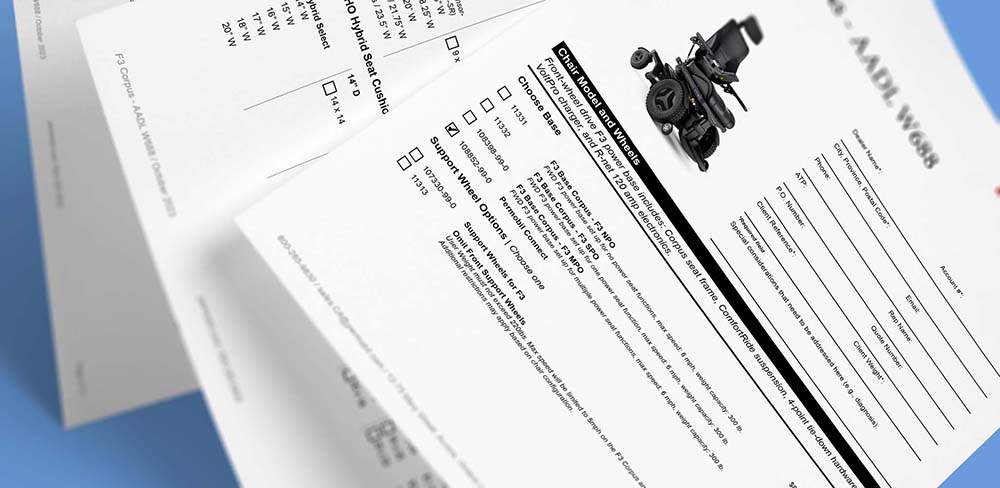
Interactive PDF forms are essential for many industries. They improve the customer experience and make the purchasing process faster and more accurate. Unlike static PDFs, these forms let users select options, enter details, and submit information directly inside the document.
With Pagination database publisher, you can automate this entire process. Product data goes directly into interactive PDF forms, keeping everything accurate and updated quickly whenever your products change.

Table of Contents
- What is an interactive PDF form?
- Why interactive forms are better than static forms?
- How to create an interactive PDF order form?
- Automating interactive PDF order forms with Pagination
- PDF forms interactivity integration
What is an interactive PDF form?
An interactive PDF form is a dynamic digital document that allows users to engage with its content, instead of just viewing it. While traditional PDFs function as static displays of text and images, interactive forms include functional elements such as:
- Clickable buttons for navigation or submission.
- Hyperlinks to other pages or websites.
- Checkboxes to select items or confirm options.
- Input fields for names, addresses, or quantities.
- Drop-down menus for product attributes such as size or color.
Clients can complete transactions, submit requests, or provide information without leaving the document.
For example, a manufacturing company might share a product order form where clients can configure product options, select features, and instantly generate a customized quote request.
Sales & product interactive PDF forms
Examples of sales pdf forms include:
- Order Forms: Customers can browse products, select items, specify quantities, and calculate totals within a single document.
- Quote Requests: Clients configure product specifications, add customization options, and submit detailed requirements directly to sales teams for rapid response.
- Product Configurators: Users choose specific attributes such as size, color, material, or features, instantly visualizing their selections and associated pricing.
Why interactive forms are better than static forms?
Interactive PDF order forms offer several advantages for businesses and customers alike. Here are some of the key benefits:
- Ease of Use: Interactive PDF order forms are user-friendly and familiar to many people, as PDFs are commonly used for document sharing. Customers can easily navigate through the form, fill in required fields, and make selections.
- Digital Convenience: Customers can access interactive PDF order forms online and save them offline, eliminating the need for physical copies.
- Save and Edit: Customers can save their progress when filling out an interactive PDF order form, allowing them to return later to complete their order. This feature is particularly useful for complex orders that may take time to finalize.
- Versatility: Interactive PDFs can be accessed on various devices, including computers, tablets, and smartphones. This flexibility accommodates customers’ preferences for browsing and ordering. Although Interactive PDFs are meant to be used in a digital context, it is possible to print them.
How to create an interactive PDF order form?
Creating an interactive form is relatively simple when you have the right tools. With software like Adobe Acrobat or Adobe InDesign, you can add form fields, buttons, and other elements to a standard document. With Pagination, you can go further and automate the entire process, generating interactive order forms directly from product data.
The general workflow to create an interactive form includes:
- Designing the layout in a PDF editor or design software or using InDesign plugins.
- Adding interactive fields such as text inputs, drop-downs, and checkboxes.
- Testing functionality to ensure forms work across devices.
- Exporting the file as a fillable PDF for distribution.
- Official tutorials from Adobe and other providers offer step-by-step guidance for beginners.
For small projects, creating an interactive PDF manually is manageable. However, for larger projects involving hundreds of products or multiple form variations, manual methods quickly become limiting:
- Manual creation is manageable for simple projects with few fields.
- Automation is recommended for large product catalogs, frequent updates, or when multiple form variations are needed.
Automating interactive PDF order forms with Pagination

Creating and maintaining order forms in PDF format for a diverse range of products can be a time-consuming task, often requiring specialized software knowledge beyond the expertise of the average person.
Pagination offers an ideal solution that streamlines the process by merging product information, applying design elements, and incorporating interactivity to create ready-to-use order forms. This approach only necessitates a data file (such as Excel, CSV, or XML) and a template designed for automation.
Pagination’s flexibility allows customers to automate almost every design and use the data structure they prefer. The data file can be custom-made specifically or come directly from a database, such as a PIM system.
Key advantages of using Pagination for interactive PDF forms:
- Automates the creation of order forms directly from product data thanks to Indesign automation.
- Supports multiple data sources, from spreadsheets to PIM or ERP systems.
- Maintains brand consistency through professional InDesign templates.
- Reduces manual work and eliminates the need for advanced design skills.
- Speeds up updates when products, prices, or attributes change.
PDF forms interactivity integration
The interactive side is achieved by leveraging the inherent interactive capabilities of Adobe InDesign, so that it becomes possible to integrate a range of interactive elements into the order form:
- Forms
These allow end-users to input various types of text, facilitating communication. - Checkboxes
End-users can make selections by interacting with checkboxes that represent different options. - Drop-down Menus
Interactive menus enable end-users to conveniently pick from a list of available choices. - Links and Hyperlinks
These can be incorporated to direct users to web pages or specific sections within the same document.

With Pagination, each option within the order form can be configured with a layout that best showcases the option itself, guiding the end customer in making the most appropriate selection for their needs.
The design of options can range from simple text descriptions or lists of choices, like an array of colors, to more intricate layouts such as tables displaying availability and pricing.
In any design setup, the integration of interactive elements can further enhance user engagement. For instance:
- Checkbox Integration
Placing checkboxes alongside part numbers or list options. - Form Integration
Adding a form field in a product description, enabling customers to input personalized values.
Key takeaways: interactive PDF forms and automation
Interactive PDF forms help businesses move from simply sharing information to actively collecting customer responses. They work well in many situations, but are especially valuable for sales processes.
- Interactive PDF forms improve the customer experience by making documents fillable and actionable.
- They are especially valuable for sales documents such as order forms, quotes, and product configurators.
- Manual methods work for simple projects but do not scale with large catalogs or frequent updates.
- Automation ensures fast updates, reduces errors, and maintains brand consistency across all forms.
- With Pagination, companies can generate interactive PDF forms directly from product data, combining speed, accuracy, and interactivity at scale.
If you need scalable and accurate pdf interactive forms for your product orders, Pagination can help.
Contact us to learn how we can transform your product data into professional, automated PDF forms that will boost your sales.