Price list automation, a subset of digital catalog management, is transforming how businesses manage and publish their pricing details. This innovative approach not only streamlines the process of creating and updating price lists but also significantly improves accuracy and customer engagement.
By automating the processes involved in updating prices, businesses can significantly reduce manual errors and ensure that their pricing information is consistent across all platforms, such as e-commerce sites and physical catalogs. This automation is crucial for maintaining competitive pricing strategies and quick adaptation to market changes, which enhances customer trust and boosts sales.
Table of Content
- What is Price list automation
- Benefits of using price list automation for your business
- Tips for automated price list success
- The publishing process: Creating an Automated Price List
- Price List Management with Catalog Automation
- The impact of Artificial Intelligence (AI) on Price list management
What is Price List Automation?
A price list is a document that outlines the prices of products or services offered by a business. Price list automation refers to the use of software or tools to generate and manage price lists automatically without the need for manual data entry or updates. This process dynamically adjusts prices based on various factors such as market demand, competitor pricing, inventory levels, and pre-defined business rules.
Using a price list maker, businesses can pull data from multiple databases, apply pricing strategies, and generate accurate and up-to-date price lists. These systems can be customized to cater to specific business requirements, including handling bulk updates, region-specific pricing, and real-time data synchronization.
Automation can encompass various aspects, including data collection, layout design, and publishing, ensuring that price lists are accurate, up-to-date, and quickly disseminated to customers or stakeholders.
Key Elements of a Price List
Product Name: The name or description of each item or service.
SKU or Item Number: A unique identifier for each product.
Description: Brief details about the product, such as features or specifications.
Price: The cost of each item, which may include different pricing tiers (e.g., wholesale, retail, discounted prices).
Additional Attributes: Information such as size, color, weight, and any other relevant details.
Benefits of Using Price List Automation for Your Business
Integrating price list automation solution into your business offers several key benefits such as:
Efficiency and Time Savings: Automating price lists significantly reduces the time and effort involved in manual data entry. This efficiency allows businesses to focus their resources on more strategic activities, thereby enhancing overall productivity and operational workflow.
Error Reduction and Accuracy: Price list automation minimizes the risk of human errors such as typos or outdated prices, ensuring that pricing information is consistently and accurately updated across all sales channels. This accuracy is vital for maintaining customer trust and reducing discrepancies.
Consistency Across Channels: Maintaining uniform pricing across various sales channels is crucial for customer trust. Automation ensures that all platforms reflect the same pricing information, eliminating the risk of conflicting prices and improving the customer experience.
Cost Reduction: By reducing the need for manual labor, price list automation can significantly cut operational costs. Additionally, fewer errors mean less time and money spent on corrections, further driving down expenses.
Dynamic Pricing and Customization Capabilities: In a dynamic market, the ability to quickly adjust prices in response to market conditions, inventory levels, and customer demand is crucial. Automation provides real-time data updates, enabling businesses to remain competitive by swiftly adapting to changes. Additionally, this flexibility extends to customizing prices for different customer segments or geographic areas, allowing for more targeted and effective pricing strategies.
Enhanced Customer Experience: Customers benefit from up-to-date and accurate pricing information, which helps them make informed purchasing decisions. This leads to increased customer satisfaction and trust in the brand
Integration with Other Systems: Price list automation tools can integrate seamlessly with other business systems like ERP, CRM, and e-commerce platforms. This integration ensures that all relevant data is synchronized and updated in real time, providing a cohesive and streamlined operation.
Tips for Automated Price List Success
Here are some tips for automating your price lists:
Understand the Scope and Requirements: Before automating your price list, thoroughly understand what you need from the system. This includes recognizing the specific challenges your business faces and identifying the goals of automating your price list.
Centralize Data Management: Centralizing all pricing data into a single system is crucial. This unification helps ensure data consistency and accessibility across the organization. This system could be a product information management (PIM) system or any centralized database that supports real-time updates and access.
Choose the Right Automation Software: Selecting the appropriate software for price list automation is vital. The software should integrate seamlessly with your existing systems (like ERP or CRM) and support various output formats to meet your business needs. It’s beneficial to choose a platform that allows for easy updates and scalability as your business grows.
Continuous Monitoring and Data Accuracy: Setting up a routine schedule for updating your price lists ensures that your data reflects the most current market conditions. This regular maintenance helps keep your pricing competitive and accurate, preventing potential sales losses due to outdated information. Ensuring that your product data, including prices, descriptions, and inventory levels, are accurate and updated in real-time is crucial. This accuracy allows the automation software to function correctly and ensures that the price lists reflect current market conditions and stock levels.
Set Pricing Rules: Establish clear rules and parameters for the automated system to follow. This includes minimum and maximum price limits, discount thresholds, and specific conditions for price adjustments.
Compliance and Security: Stay compliant with any regulatory pricing requirements relevant to your industry. Implement strong security measures to protect sensitive pricing data and maintain customer trust.
To protect access to integrated systems such as ERP, CRM, and PIM platforms, use one of the best free password managers to securely store and manage credentials. This reduces the risk of unauthorized access, credential leaks, or weak passwords, especially important in automated workflows that touch multiple business systems.
Employee Training and Support: Train your team on how to use the automation tool effectively. Ensure they understand how to intervene manually when needed and how to troubleshoot common issues.
The Publishing Process: Creating an Automated Price List
The publishing process is essential for companies looking to create commercial documents such as price lists, catalogs and multilingual brochures, which can be printed or distributed digitally. Traditionally, this process is time-consuming and requires substantial human effort, as it involves several key activities:
- Data Enrichment
- Template Design and Layout Creation
- Publish the Price List
When you start creating a price list, you probably have a deadline to meet, and accurately estimating the time required can be challenging. To save time, enhance accuracy, and streamline the creation process, the best approach is to manage it using price list automation software. This solution not only meets deadlines efficiently but also ensures precision and simplifies the entire workflow.
Key Phases in the Price List Automation Process
Embracing either automated price list solutions or traditional manual approaches necessitates a deep understanding of the integral steps involved in the digital publishing workflow. Here’s a closer look at these essential stages, optimized for businesses aiming to refine their commercial document production:
Data publication into a layout (manual and automatic)
After data enrichment, the next step in price list automation involves inserting the product information into the publication’s layout. This can be done either manually or using price list automation software. Whether utilizing automated price list solutions or relying on traditional manual methods, a thorough understanding of the digital publishing workflow’s core steps is crucial. This knowledge helps businesses enhance their commercial document production processes.
Let’s first examine how the manual process works, and then how the workflow can be made faster and easier with an automated process.
Manual or “Handmade” publishing
The manual process is usually handled by graphic designers and involves significant time and effort. The copy-paste activity (from the spreadsheet to the price list) must be accurate, as any inaccuracies can cause serious errors, especially in sensitive fields like pricing.
Below is a step-by-step outline of the activities related to a manual publishing workflow:
- Planning and Framework Development: The product marketing and graphics departments plan a framework for the product layout and content.
- Data Submission: Product marketing submits all the product information that needs to be inserted in the price list through various methods (initial Excel files, emails, Post-it Notes, PDF revisions, photocopies of paper-based revisions, midnight phone calls).
- Layout Design: The graphics department is responsible for fitting this information into a coherent and intelligible document. Given their control over the “last mile” of price list production, they are often called in to fill in random voids of information at the last minute.
- Revisions and Approvals: Revision approval cycles follow; new products and lines are added, and the cycle repeats itself.
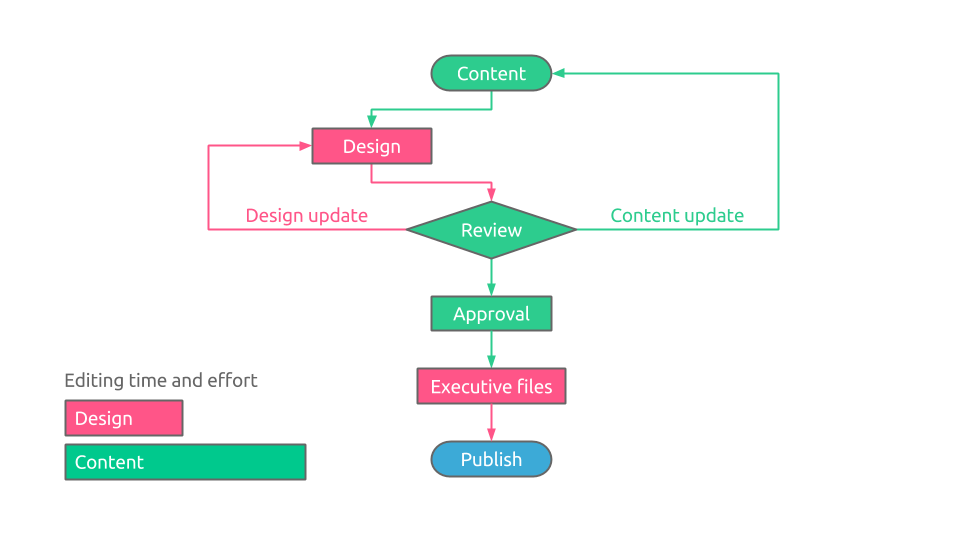
> The workflow of the manual publishing process
Automatic Publishing with a Price List Automation Solution
The automatic process is driven by price list software. Price list software is an essential digital tool for businesses aiming to optimize their pricing strategies and streamline catalog management.
Pagination’s price list document creation software enables you to design custom templates using Adobe InDesign (desktop publishing and typesetting software). These templates can be linked to business applications (ERP, PIM, E-commerce, CRM) via API or data files (Excel, CSV, TXT, XML), containing the information you want to insert in the price list.
To update your price list using Pagination’s price list software, simply upload the relevant data file and any product images (if not already included in the data file via URLs) to the cloud using the online interface or through your integrated application (if an API integration has been developed).
Within a few minutes, the software will generate both InDesign and PDF files optimized for web and print use, eliminating manual data entry errors and significantly reducing document creation time. Additionally, it eliminates the need for manual entry of prices and other information, as this process is handled automatically by the price list software.
When using the automatic approach, documents are 100% complete and always ready to publish both online or as hard copies. This ensures that all information is accurately and efficiently updated, reducing manual effort and minimizing the risk of errors. The automation process streamlines the creation and publishing workflow, making it more efficient and reliable.
Features of Pagination Price List Software
- The main features of this software are:
- Fully Automated Publishing: Automatically creates PDF and InDesign files by simply loading the data file (API optional).
- Complete data import: Easily import your CSV, Excel, TXT, Google spreadsheets, and XML files as they are without adapting them to a predefined data structure.
- Design Freedom for Product Templates: Users have the freedom to create the best layouts for their products or services within InDesign, without having to worry about making the designs automatically compatible with the software.
- Custom Publishing Rules: The software enables the implementation of any industry-specific publishing rules that might be necessary.
- Faster Creation of Customized Price Lists: This tool allows for the rapid creation of unlimited documents tailored for different customers, languages, currencies, or regions. It boasts an average throughput of up to 100 pages per minute.
- Automatic Detection of Invalid Data: The price list document creation software includes an automatic analysis feature that identifies issues in the data source, such as missing fields, duplicate part numbers, incorrect or misspelled field names, and invalid values.
- Reduction of Document Creation and Updating Times: It significantly speeds up the publishing process from days or months to mere minutes, resulting in a reduced time-to-market.
- Error-Free Documents: The system ensures zero errors in documents by eliminating the need for manual data manipulation.
- Significant Savings on Production Costs: Substantial savings are achieved through time efficiency in both design and revision processes.
- Integration of Structured and Hand-Crafted Documents: Allows for the integration of hand-crafted covers, creating consistently perfect documents. The InDesign Book feature facilitates the seamless addition of front and back covers via cloud upload.
- User-Friendly: The cloud-based nature of the software means that anyone in the company can use it easily, without requiring specific training, and access it from anywhere at any time.
- Flexible Customer Support: For any template changes, users can either send the modified InDesign file to the support team or explain the changes needed.
- Sales Enhancement: The software enables the easy creation of more documents, in various languages and currencies, or with specific product ranges. This functionality is effective for current markets and for expanding into new regions.
- Automatic exporting in multiple formats: At the end of the creation process, you can effortlessly obtain multiple output files by clicking a link in an email. This will provide you with several formats, including INDD (Adobe InDesign), IDML (InDesign Markup Language), package files, web-ready PDF, and print-ready PDF.
Key Activities in Automated Document Publishing
Below are the activities related to publishing a price list using a price list automation solution or InDesign catalog automation software.
Collaborative Design Process:
The marketing team and graphics department create the price list layout they want to automate. This layout, usually an InDesign file, is implemented in the cloud database publishing software.
Cloud-Based Updates:
Each time an updated version of the price list is required, it’s only necessary to upload the new related data file to the cloud. The new document is automatically created in both InDesign and PDF formats within seconds. A real-time preview (PDF) is easily viewable directly on the browser.
Static and Dynamic Parts:
- The static parts of the documents—usually those that are not updated often—remain hand-made and are uploaded to the cloud. These include the front and back covers, introduction pages, advertisement pages, terms and conditions, etc.
- The dynamic parts include the price list’s table of contents, product pages, and chapter separators, which are created after pulling the information from the data files.
By adopting our automated solution, your documents will always be complete, up-to-date, and ready to impress your audience, setting a new standard for efficiency and accuracy in digital and print publishing.
This is the workflow Pagination’s cloud database publishing service follows.
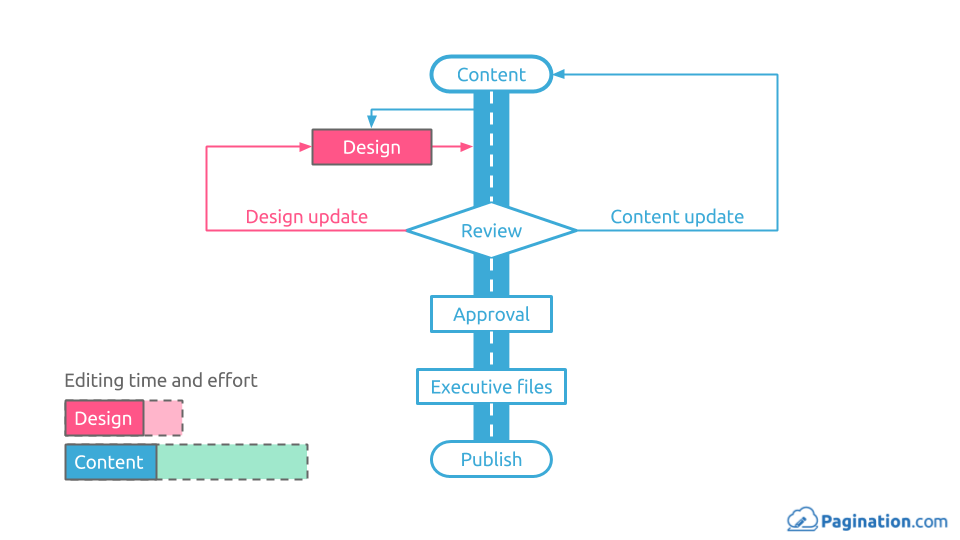
> The workflow with a catalog automation solution
InDesign/QuarkXPress Plugins for Price list Creation
Several InDesign plugins or QuarkXPress plugins on the market allow you to create price lists automatically. Unlike price list document creation software, these plugins, which operate fully automatically, require installation first. Manufacturers often sell them under a license valid for only one computer. Furthermore, the license frequently depends on the version of InDesign/QuarkXPress you wish to use; thus, you must also update the plugin (for a fee) whenever you update your desktop publishing and typesetting software.
Challenges and Limitations of Using InDesign/QuarkXPress Plugins
Developing a good understanding of the plugins is complex and difficult. The steep learning curve often imposes some limitations on the final graphic layout, resulting in a document that could be less complete or less attractive than you require.
These limitations often translate into accepting a partially automated document, which requires additional manual editing. A graphic designer must perform this manual work, increasing the time and cost to complete each revision.
Furthermore, when changes have to be implemented in the document’s structures, you’ll often find that you do not retain the knowledge necessary to complete even the initial setup. This skill falls into the “use it or lose it” category.
Features of InDesign/QuarkXPress Plugins
These plugins usually provide the following features:
- Data Import
Import CSV, Excel, Google Spreadsheets, and XML files.
- Modify your data within the plugin
You can manage your data in a spreadsheet-style panel within the plugin.
- Bidirectional link (data source – InDesign document)
Link your data to an InDesign/QuarkXPress document. If you connect the data source to your template, your document will always be updated. The link is bidirectional, so you can make changes to the data in the document.
- Product templates creation
You can create templates and easily drag them from the library to the page, and the template will then be populated with live data.
Price List Management with Catalog Automation
Integrating catalog automation into price list management allows businesses to quickly respond to market changes, maintain consistent product information across all channels, and improve the overall customer experience. This technology streamlines the creation, update, and distribution of price lists, ensuring they are accurate, up-to-date, and aligned with the latest product offerings. By automating these processes, catalog automation reduces manual input, minimizes errors, and enhances efficiency and accuracy.
You can use Pagination’s catalog software to automatically create and publish catalogs and price lists for your products and services. This software streamlines the entire process, ensuring your catalogs and price lists are accurate, up-to-date, and visually appealing. With seamless data integration, customizable templates, and support for dynamic pricing, Pagination’s catalog maker software helps you efficiently manage and publish your product information across multiple channels, enhancing both operational efficiency and customer experience.
The Impact of Artificial Intelligence (AI) on Price List Management
Artificial Intelligence (AI) significantly enhances price list management, offering multiple advantages that transform how businesses handle pricing strategies and updates.
Customer Segmentation and Personalization: AI-powered price optimization algorithms analyze large datasets to predict customer behavior and market dynamics accurately. AI enables businesses to segment their customer base effectively and personalize pricing strategies. By analyzing purchasing behavior and preferences, AI tailors pricing and promotions to different segments, increasing sales and customer loyalty.
Improved Efficiency and Time Savings: Automating price list management with AI significantly reduces the time and effort required for manual updates. AI systems can quickly implement pricing changes across all channels, freeing up valuable time for employees to focus on strategic initiatives. This efficiency is crucial for businesses looking to scale and adapt quickly to market changes.
Data-Driven Insights and Predictive Analytics: AI provides deep insights into customer behavior and market trends through sophisticated data analysis. Predictive analytics powered by AI can forecast future pricing trends and demand, allowing businesses to make informed decisions. These insights enable data-driven decision-making, helping to tailor pricing strategies effectively and optimize revenue.
Dynamic Pricing and Real-Time Adjustments: AI enables dynamic pricing by analyzing real-time data such as market demand, competitor prices, and inventory levels. This allows businesses to adjust prices in real-time, ensuring they remain competitive and optimize revenue. For instance, e-commerce platforms often use dynamic pricing to adjust product prices based on demand and inventory levels
Streamlining Production with AI: The automation process, powered by AI, streamlines the entire price list production from data entry to final publishing. AI accelerates the layout finishing process by automatically adjusting images, text, and other elements to meet predefined standards, reducing the time and effort required by graphic designers and content managers.
Streamline Your Workflow with the right Price List Automation Solution
The processes involved in price list publishing—data collection and integration, template design and layout creation, review and adjustment, publishing, and continuous monitoring—are all mandatory for creating accurate, consistent, and up-to-date price lists. Your workflow can vary significantly in terms of time and costs during the data publication phase, depending on whether you use a manual or automatic publishing process.
A price list automation solution can optimize the entire price list management process. By automating these processes, businesses can reduce manual errors, ensure consistent pricing across all platforms, and quickly adapt to market changes.
Take your business to the next level with Pagination’s price list software. Automatically create and publish price lists for your products and services, ensuring they are accurate, up-to-date, and visually appealing.