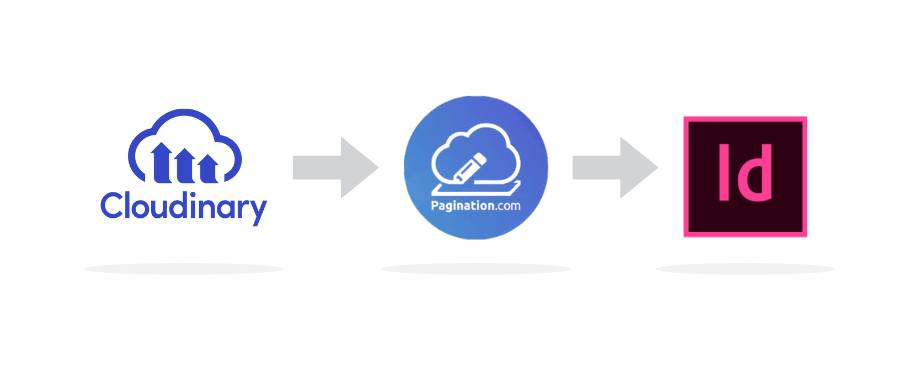
Cloudinary assets can be connected to Pagination, our cloud database publishing that automatically creates professional InDesign documents.
Companies use Pagination with Cloudinary to produce ready-to-print catalogs, technical sheets, and SKU books, both in InDesign and PDF formats.
Cloudinary assets can easily be linked to Pagination using our API or in our cloud app. Combined with Excel product data and custom InDesign templates, documents are automatically generated in minutes, ensuring speed, brand consistency, and seamless DAM integration.
Once created, the documents can be automatically uploaded back into Cloudinary with the metadata, so they remain searchable, classified and always aligned with the company’s approved assets.
Table of Contents
- Assets in Cloudinary
- Why print and PDF?
- Document quality and InDesign
- From Cloudinary to InDesign
- American Bath Group: from Cloudinary assets to product catalogs with Pagination
Assets in Cloudinary
Working with Cloudinary images and assets inside InDesign is a smart way to ensure consistency and quality.
The elements contained in catalogs and price lists are not only product data, but also images: and Cloudinary is a platform designed to manage this type of content efficiently.
Compared to other business applications, Cloudinary is particularly suitable for:
- Centralizing all approved visuals in one place
- Organizing product images with tags, metadata, and categories
- Managing multilingual or multi-brand asset variations
- Ensuring that the latest version of each image is always available
In short, Cloudinary is a great platform for storing and controlling the images you want to publish in a catalog or technical document.
Without a system like Cloudinary, companies run the risk of spreading assets across too many locations. Updating and retrieving them takes time, which can result in inconsistencies, duplication, or outdated visuals being published.
Why print and PDF?
When product data and images are managed in Cloudinary, it’s easy to update and present them on the web. But in many cases, information also needs to be delivered in a well-structured and complete document, designed for print or professional digital publishing. The reasons are clear: print and PDF documents often achieve higher conversion rates, and there are plenty of examples to prove it.
These documents make it easier for customers to buy, and they give sales teams stronger tools to sell.
Catalogs, technical sheets, and SKU books support both sales and marketing teams by:
- Presenting products in the right order
- Ensuring brand consistency by following style guidelines
- Enhancing the perceived value of products
- Helping customers quickly find the information they need
These are exactly the things that the Web alone cannot fully provide.
Document quality and InDesign
When a company wants to publish product information from the web, such as data stored in management software or on an e-commerce platform, into a ready-to-print document or PDF file, some challenges inevitably arise. Print-ready documents have specific requirements inherited from the long tradition of print design and typography: layouts, grids, fonts, bleeds and slugs, CMYK color spaces, and more. Even the slightest inaccuracy in these areas can compromise the final result.
For all these reasons, expectations for a document destined for print are much higher than for one intended for the web. Yet, the fast pace of digital publishing is now influencing the production cycles of the print industry as well, pushing companies to deliver high-quality documents in less time.
Technologies like Cloudinary often include an “export to PDF” feature. However, in most cases, the results are not perfect, and if a company aims to enhance and bend the logic of HTML to a PDF engine, the path is very hard.
The only way to guarantee the quality of a professional, print-ready document is to produce it through InDesign. This is precisely the service we provide at Pagination: combining the speed of automation with the quality and reliability of Adobe InDesign.
From Cloudinary to InDesign
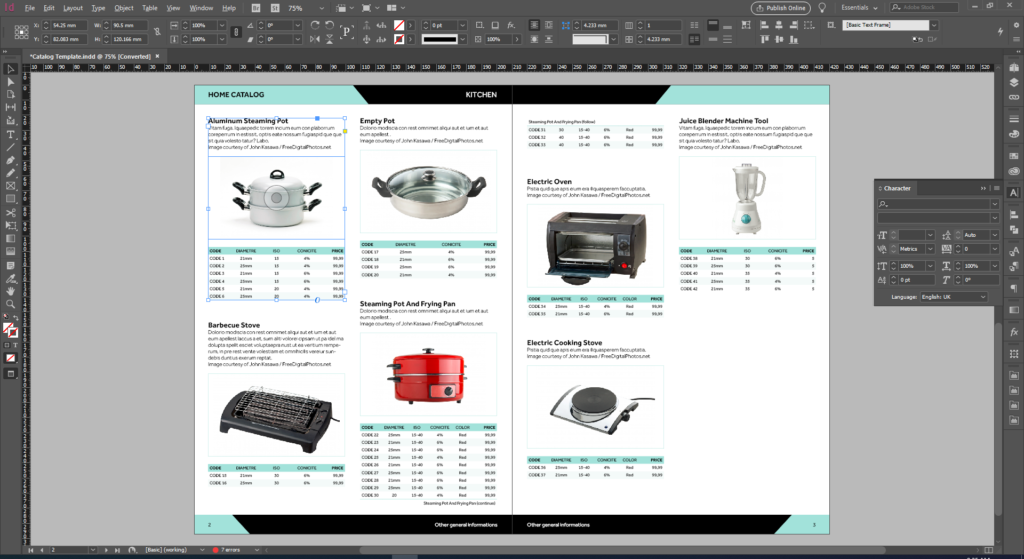
With Pagination, it is easy to combine structured product data with the images stored in Cloudinary and automatically generate professional documents in both InDesign and PDF formats. Static and dynamic sections can be merged seamlessly, so catalogs, SKU books, and technical sheets are ready to publish in just minutes.
Companies worldwide rely on Pagination to create multi-brand catalogs and technical documentation that stay perfectly aligned with their DAM assets.
It’s simple to connect Cloudinary to Pagination because the assets managed in the DAM are already organized, tagged, and ready to be used in automated publishing workflows.
-
Data & templates
Companies export Excel files from their ERP, PIM, or internal systems. These data files are uploaded into Pagination’s cloud platform and combined with custom InDesign templates that define layout, branding, and covers. This ensures that every document respects brand guidelines while remaining easy to update whenever the data changes.
-
Image binding
Pagination automatically connects every product in the data file with the corresponding image stored in Cloudinary. Images are then placed into layouts, whether they need to appear inside technical tables or on illustrated product pages. This integration eliminates manual file handling and keeps visuals consistent across all publications.
-
Output
Once data and images are connected, the system generates production-ready InDesign and PDF documents directly from the cloud. Thousands of pages can be created in minutes, reducing production time from weeks to hours. The output is professional, accurate, and immediately available for distribution or further design refinements.
-
Upload back to DAM with metadata
The workflow doesn’t end with publishing. The documents generated by Pagination can be automatically uploaded back into Cloudinary, enriched with metadata. This makes each document searchable, properly classified, and always accessible to teams, distributors, and partners. By closing the loop with the DAM, companies ensure that both images and documents remain perfectly synchronized and up to date.
American Bath Group: from Cloudinary assets to product catalogs with Pagination
American Bath Group (ABG), a leading North American manufacturer with 21 brands and thousands of SKUs, relies on Pagination and Cloudinary to produce catalogs, technical sheets, and SKU books.
By integrating Cloudinary with Pagination, ABG streamlined its publishing workflow. All product images are sourced directly from the DAM to Indesign, while the generated tecnical sheets in PDFs are automatically uploaded back into Cloudinary with the correct metadata. This makes every document easily searchable, so the team can always find the right version when needed.
As a result, ABG can now produce brand documents much faster, with greater consistency and reliability across all its product lines.
Learn more about ABG’s project with Pagination →

Integrating Cloudinary with Pagination gives companies a seamless way to turn digital assets and product data into professional catalogs, price lists, technical sheets, and SKU books.
If your organization is looking to connect Cloudinary to InDesign and automate its publishing process, Pagination can help.
Ready to see it in action? Contact us or watch the demo.