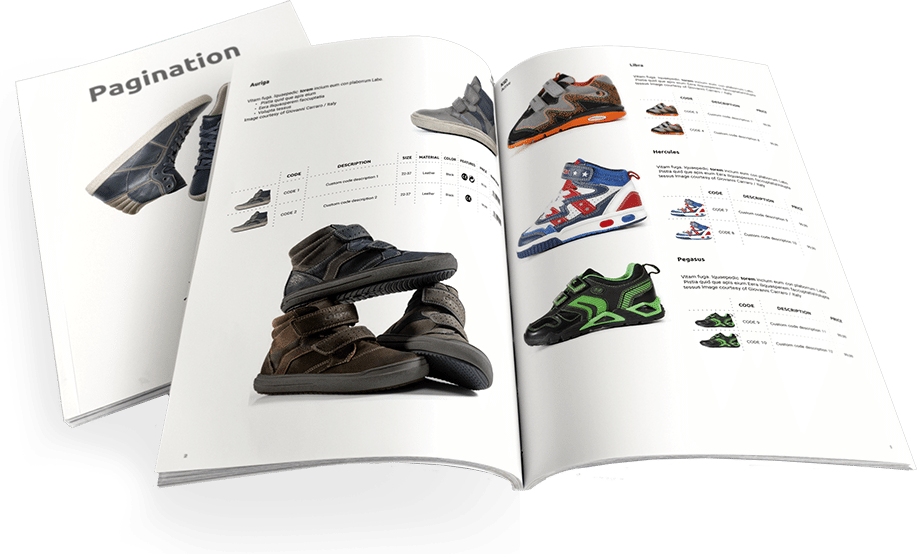
If your product information is stored in an ERP, PIM, CRM, or e-commerce platform, you can use Pagination to automatically create professional documents like catalogs, price lists, brochures, and technical sheets in Adobe InDesign and PDF format.
From Database to Document: How to Create Professional Catalogs with Pagination Using Your Business Data
ERP (Enterprise Resource Planning), PIM (Product Information Management), CRM (Customer Relationship Management), and E-commerce platforms sit at the core of your company’s information ecosystem, from technical specs to sales, logistics, and customer data. These tools are essential for streamlining workflows across departments such as production, R&D, purchasing, sales and marketing, HR, accounting, and finance.
Let’s take a look at how easy it is to generate high-quality documents starting from the data stored in these systems. Whether you want to:
Pagination allows you to transform raw business data into print-ready files in just a few minutes.
This large amount of data is stored in business software that needs to be accessible anytime and anywhere. It must be easy to update, analyze, and compare with speed and accuracy. All of these tools allow you to export your data in standard formats like Microsoft Excel, CSV, TXT, or XML, which you can then use to support your business communication across multiple channels such as e-commerce platforms, printed catalogs, flipbooks, and mobile apps.
Create a price list using ERP
What is ERP?
Enterprise resource planning (ERP) is an all-in-one software package that covers all of a company’s core processes, such as finance and accounting, management accounting, human resources, manufacturing, order processing, supply chain management, project management, customer relationship management (CRM) and data services. The main function of an ERP package is to streamline processes and information across the company. ERP systems are usually on-premises, cloud-hosted, or SaaS.
How can you create a catalog from ERP?
Starting from scratch, you will need a data file and an InDesign layout to create a professional catalog. The good news is that all ERPs can export data in the Excel, CSV, and TXT formats. About the layout, you can create an InDesign template yourself, or ask a graphic designer/agency to create one. When you have both files ready, there are two options available:
- Create a catalog manually
(requires days/months of copy-pasting to create the first version. Then, whenever you need to make changes, you must re-edit the whole project) or;
- Create a catalog automatically
(you can get the latest version in a few minutes).
Reduce the number of errors, speed up workflow and time-to-market using your custom template, saving on time and costs are just some of the benefits you can get using a cloud database publishing service like Pagination. When the product information is ready, you only have to run a pagination and you will have ready-to-print and web-ready documents in a jiffy. Marketers will be happy and designers can focus on their main task: creating beautiful and functional graphics artifacts! Check the next paragraph on how to export data from the most used ERPs.
How can I export data from ERP?

Microsoft Dynamics Nav export to excel
You can export data in Excel in both Microsoft Dynamics NAV and Microsoft Dynamics 365.

SAP export to excel
SAP’s ERP enables you to export your data as various spreadsheet formats, such as XLS, XML, and ODS. This SAP ERP tutorial helps you do this.

Sage export
Here how to export the various reports in CSV format with Sage.

Oracle NetSuite export to excel
To learn how to export Excel and CSV format with Oracle NetSuite you can check out this video by the Rand Group, which gives an example of how to export your customers’ data.

Infor export to Excel
With Infor, you can follow a simple procedure to export data to Excel from Infor.

Epicor
Check out this video tutorial to master how to export data from Epicor’s ERP.
Create a catalog using PIM
What is PIM?
PIM stands for “product information management.” It is a type of software that allows you to aggregate all product information and improve its quality for omnichannel publishing, such as websites, print catalogs, ERP systems, and electronic data feeds to trading partners. It is mainly used for improving product descriptions, technical specifications, sizes, pricing and availability information, images, instruction manuals, and related products.
How to create a catalog from PIM?
First, you’ll need a data source file and an InDesign layout to create a professional catalog. Of course, you can export your data to Excel, CSV or TXT format from your PIM. Regarding the layout, you can create it yourself, or ask a graphic designer/agency to create it. When you have both files, you will choose between these two options:
- Create a catalog manually
(this requires days/months of copy-pasting for the first version to be created. Then, whenever you need to change something, you have to modify the whole project) or,
- Create a catalog automatically
(you can update your document in a few minutes).
Enjoying fewer errors, speeded-up workflow, less time-to-market using a custom template, and saving time and costs are just some of the benefits you can get when using a cloud database publishing service like Pagination. Once the product information is ready, you only have to run a pagination to have print- and web-ready documents in minutes. Marketers will be happy and designers can focus on their favorite task: creating beautiful and functional graphics! Take a look at the next paragraph to learn more about how to export data from the most used PIMs
Which PIM I can use?

SAP Hybris
Read this guide to learn how to export your SAP Hybris data in CSV format.

IBM InfoSphere
To export your data in CSV and XML format from IBM InfoSphere quickly and correctly, read this comprehensive guide.

Akeneo export
Find out how to export your data in CSV and XLSX from Akeneo by creating an export profile.

STEP Stibo Systems
Export data and digital assets maintained within the STEP system to different formats such as CSV, Excel, SAP, and XML. Industry-specific and proprietary plug-ins can be developed to meet unique or proprietary formats.

Pimcore export
Pimcore offers the possibility of exporting your data in CSV format. Learn how to export your data in CSV format from Pimcore.

inRiver
Using the Syndicate App from InRiver, you can export your files in different formats. Watch here a short demo of Syndicate.

Salsify
Salsify offers you the possibility of making a bulk export of your products.

Plytix
Take a look at this useful guide if you need to export your data from Plytix.

Oracle PIM
You can export your products from Oracle by following this guide. Instructions are under the “Browsing the Item Catalog and Alternate Catalogs” section.

Agility Multichannel PIM
At the moment, there is no guide explaining how to export your data from Agility’s Multichannel PIM.
Create a catalog using CRM
What is CRM?
CRM refers to customer relationship management. It’s a type of business software used to manage interactions between a sales team and its leads or customers. A CRM suite a place to store all the sales information and can help you to drive sales growth using easy-to-understand graphic insights such as a sales funnel.
How can I create a catalog from a CRM?
You’ll need a data file (Excel, CSV, XML) and an InDesign layout to create a professional catalog. You can export data from your CRM in Excel, CSV, or TXT format. About the layout, you can create it yourself, or ask to a graphic designer/agency to create it for you. When you have both files, you will then choose between these two options:
- Create the catalog manually (this requires days/months of copy-pasting for the first version to be created. Then, if you have to change something, you must modify the whole project) or,
- Create the catalog in automatic (update your document in a few minutes).
A reduction in errors, an acceleration of your workflow and time-to-market using a custom template, and a reduction in costs and time are just a few of the benefits you’ll enjoy when using a cloud database publishing service like Pagination. When the product information is ready, simply launch a pagination and you will have print- and web-ready documents in just a few minutes. Marketers will be happy and designers will be able to focus on their favorite task: creating beautiful and functional graphics! Take a look at the next paragraph to learn more about how to export data from the most used CRMs.
Which CRM can I use?

Salesforce CRM
You can easily export data from Salesforce, either manually or on an automatic schedule. The data is exported as a set of comma-separated values (CSV) files. Read more here on how to create a catalog from Salesforce with Pagination.

Zoho CRM
Learn how to export data in CSV format from Zoho CRM.

HubSpot CRM
Learn how to export your data using HubSpot.

SAP CRM
You can export your data in a spreadsheet with SAP‘s CRM.

Sugar CRM
You can export your data in a CSV file from Sugar’s CRM.

Freshsales
You can easily export your information in a CSV file from Freshsales.

Pipedrive
Follow these steps to export your data from Pipedrive.

Insightly
Using Insightly, you can export your data in both CSV and XML formats. This guide explains how to export in CSV format, while this one explains how to export in XML format.
Create a price list using e-commerce software
What is e-commerce software?
E-commerce (electronic commerce) is the act of buying or selling goods via online services or over the Internet. The term “e-commerce” can also describe any kind of commercial transaction that is facilitated through the internet. These business transactions occur either as business-to-business (B2B), business-to-consumer (B2C), consumer-to-consumer (C2C), or consumer-to-business (C2B). ”E-commerce software” refers to an application that makes all of this possible
How can I create a catalog using e-commerce?
First, you’ll need a data file; you can export them in Excel, CSV, or TXT format from your e-commerce platform. Then, you’ll need an InDesign layout to create your catalog. You can create it on your own or ask a graphic designer/agency to do that for you. When you have both files, you will choose between two options:
- Create a catalog manually (this requires days/months of copy-pasting for the first version to be created. Then, to modify the document, you have to edit it all again) or,
- Create a catalog automatically (The update of the document takes just a few minutes).
You can enjoy many benefits when using a cloud database publishing service like Pagination, such as a reduction in errors, a speeded-up workflow, and less time-to-market using a custom template, all of which will save your time and costs. Once the product information is ready, you only have to run a pagination and you will have documents that are ready for printing and/or the web in a couple of minutes. Marketers will be happy, and designers will be able to focus on their favorite task: creating beautiful and useful graphics! Take a look at the next paragraph to learn how to export data from the most used e-commerce platforms.
Which e-commerce platforms can I use?

Shopify
Using the Salsify app for data export-reports, you will be able to export your data in minutes.

Magento
Magento makes it possible to export your data in CSV format.

Squarespace
Here you’ll find a quick tutorial on how to export your data in CSV format.

PrestaShop
Using the Prestashop Export Module, it’s possible to export your data in CSV, Excel, and XML. Click here to watch a tutorial on exporting your data from Prestashop.

Weebly
Click here to learn how to export your data from Weebly in CSV format.

BigCommerce
Follow this step-by-step guide on how to export your products from BigCommerce.

OpenCart
To export your products with OpenCart, you’ll need to install an extension:
You can also watch this OpenCart export tutorial for help.

Drupal Commerce
Follow this detailed tutorial on exporting product data from Drupal Commerce to CSV.

Wix
Check out this guide on exporting product CSV files from Wix.

Volusion
Volusion allows you to export your product data easily. Follow this CSV export guide for Volusion.

WooCommerce
In this article, you’ll find out how to import and export products in WooCommerce.

GoDaddy
If you’re using GoDaddy, you can export your products following this CSV export tutorial for GoDaddy.

XCart
Check out this tutorial on exporting product data from XCart to CSV.

Zen Cart
Here’s a quick reference on how to export products from Zen Cart.

AShop
This tutorial walks you through the process of exporting products from AShop to a CSV file.
Make Professional Product Catalogs with Pagination
Why spend countless hours manually creating catalogs when your data can do the heavy lifting? With Pagination, transform product information from your PIM, CRM, or ERP system into professional catalogs in minutes. This catalog maker tool lets you make a catalog with just a few clicks, creating a seamless path from PIM to InDesign, from CRM to InDesign, or directly from ERP to InDesign.
Whether starting with spreadsheets or complex databases, you can quickly make a catalog from Excel or other formats and distribute polished digital product catalogs across all channels.
Why not put your data to work? Let it tell your product story through beautifully designed catalogs that capture attention and drive sales.
Start your next catalog project with Pagination.