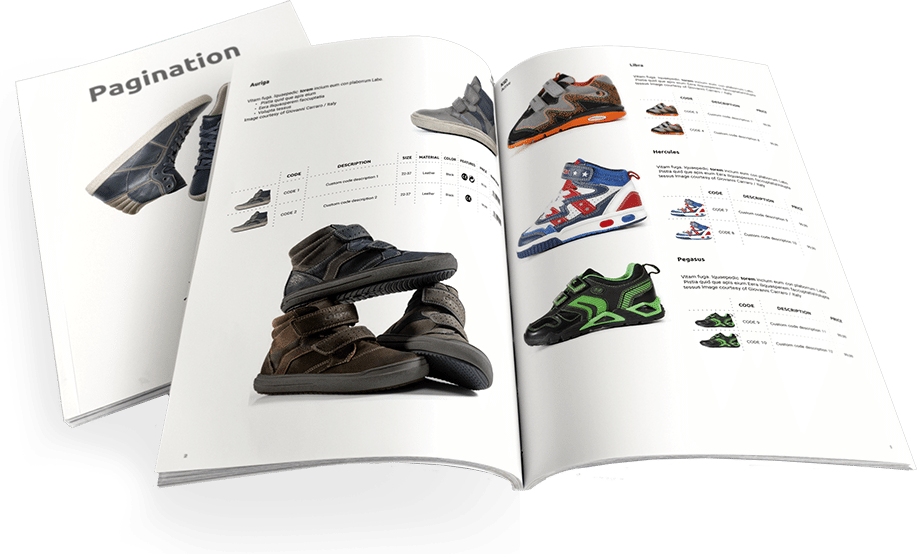
Pagination enables you to create up-to-date, high-quality PDF and InDesign documents in moments. Each project can be tailored to your unique requirements, faithfully respecting your communication guidelines.
With Pagination, you can use your custom layout rules to create perfect documents, enabling you to save time, improve accuracy, and simplify even the most complex publishing project.
Let’s explore some of the most common Pagination features, starting from what is included in the Professional Edition.
Professional Features
- 40 Paginations
- Predefined data file
- Up to 1000 SKUs
- Up to 200 Images/Assets
- 1 User
- Unlimited Color Change
- Output files in PDF format
- Access via web browser
- Customer service
- Basic multilingual
- Email Notification System
- Auto Breaks
- Magic Tables
- Dynamic Category Changes
- Product Grouping
- Multiple Paragraphs and Character Styles (HTML tags)
- Asset Management
Business Features
- Unlimited documents (24/7)
- Your InDesign file
- Your data file
- Up to 4000 SKUs
- Up to 1000 Images/Assets
- 1 User
- Up to 20 Fields
- Output files: PDF/InDesign
- Classic Table of Contents
- Basic Cover Merging
- Access via the web browser
- Customer service
- Basic multilingual
- 1 simple product layout
- Page/chapter separators
- Email Notification System
- Dynamic Category Changes
- Product Grouping
- Multiple Paragraphs and Character Styles (HTML tags)
- Auto Breaks
- Simplified Attribute Management
- Magic Tables
- Automatic Barcode and QR Code Generation
- URL Links
Enterprise Features
- Multiple product layouts
- Complex product layouts
- Advanced multilingual
- Multiple users
- Unlimited fields
- Unlimited images/assets
- Advanced Cover Merging
- Download Image from URL
- Different types of TOCs
- Multiple Data Sheet Relationship (Data Integration)
- Merge Automatic and Crafted Documents
- Multiple Product Relationships
- Legacy app Integration
- Access via API
- Service Level Agreements (SLA)
- Throughput: scalable
- Custom PDF export profiles
- Multipricing
- Dynamic Legends/Notes in the Page Footer
- Handling Large Datasets
- Vertical Table Justification
- Predefined Number of Final Pages
- Export Image Scale %
- Single Sign-On Authentication
- Automated User Lifecycle Management (SCIM)
Featured in the Professional Edition
40 paginations (24/7)
You can create your document up to 40 times (40 PDFs). If you need more paginations during the year, you can buy a bundle of 20 paginations for $200/pack – €150/pack – £135/pack.

Predefined data file
Fill the spreadsheet (Excel) with your product information following the instructions guide you find inside the template folder. If you want to use your own data file (CSV, Excel), the price will increase by $700/year – €600/year – £550/year.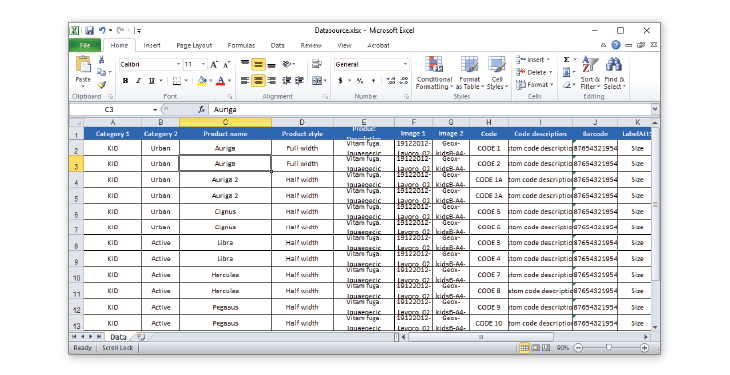
Up to 1000 SKUs
The data file (Excel / CSV) may contain up to 1000 SKUs (1001 rows of a spreadsheet). If you handle more items, you can request a project extension to add other 1000 SKUs. The price of this extension will increase the price by $1,650/year – €1.500/year – £1,350/year.
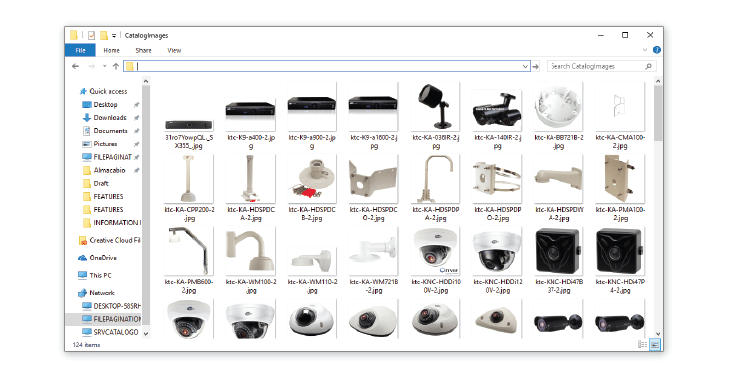
Up to 200 Images/Assets
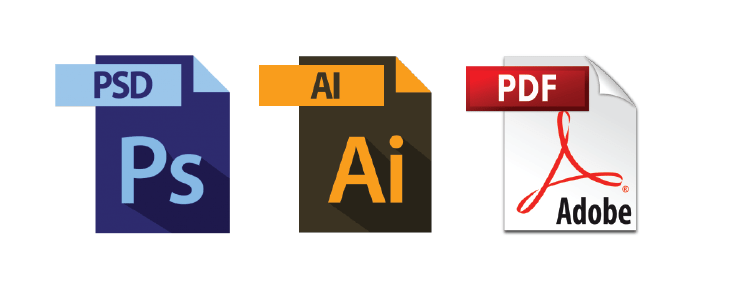
Upload up to 200 images using common formats such as JPEG, JPG, TIFF, PNG, and GIF and files such as AI, EPS, PSD, INDD, IDML, PDF, etc., to create your document automatically. If you need more images, you can buy a bundle of:
- 200 images for $500/pack – €450/pack – £400/pack (you can buy up to 4 packages)
- 800 images for $1,650/pack – €1,500/pack – £1,300/pack (only one package can be purchased)
One user
The service can be used by one (1) user.
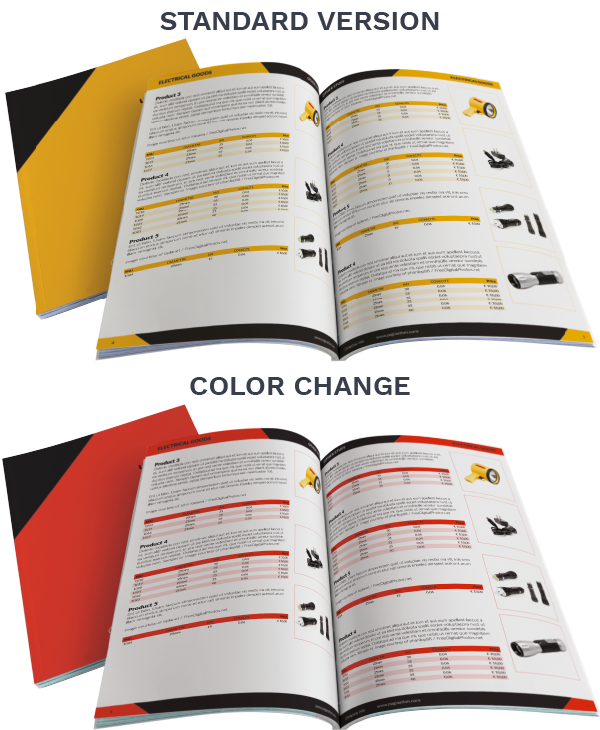
Unlimited Color Change
You can change the main color of the template as often as you like.
Output files in PDF format
Create your documents in two PDF formats:
- High-quality and ready-to-print (high-res images – 300dpi)
- Lightweight version for agile web publishing (low-res images – 72dpi).
Access via web browser
Since Pagination is a cloud-based solution, you need an internet connection to use it. You can easily log in from your favorite browser (Chrome, Firefox, Edge/Internet Explorer, Safari, Opera, etc.).
Customer service
You can contact Pagination by filling out the form. Our Support Team is also reachable by phone at the following times:
MON–FRI
9:00 AM – 1:00 PM CET/CEST
2:00 PM – 6:00 PM CET/CEST
Basic multilingual
You can use the Latin alphabet to describe your product information and your document will be created in your preferred language. If you would like to use Cyrillic, Greek, or Arabic alphabet, please tell us when purchasing.

Email Notification System
Pagination provides an email notification system that informs you of the most relevant events related to the document you are creating. You will receive a message when:
- The pagination process starts
- The pagination process ends and your documents are ready to be downloaded
- If there are any errors in the pagination process
Auto Breaks
When there is a change in a spreadsheet, an automatic publishing flow interruption can be associated with it:
- Product break at your preferred change
A new product begins when, for example, the product name is changed - Category break at category change
Insert a page break when a category is changed - Document break at your preferred break (InDesign book feature)
Automatically split your document into many sections (e.g., chapters) and create an InDesign Book file (INDB) to give you more editing flexibility.
Magic Tables
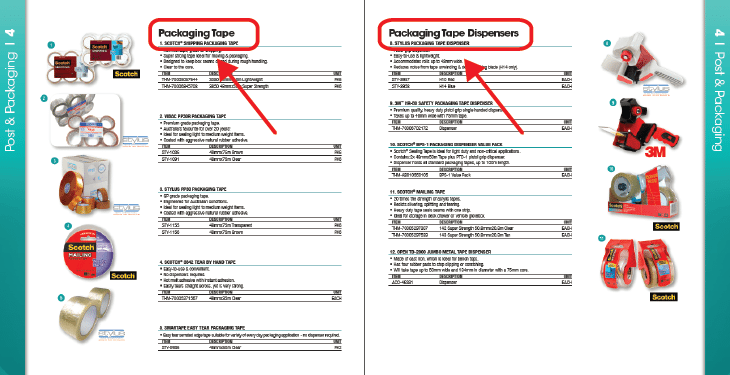
- Table header (continued) and product images on a new page
If a table will not be completed on a single page, Pagination will publish the remaining table data in the next page, repeating the table header and the main product image(s). - Adaptive columns
Increase the width of the column to a minimum required space, avoiding line breaks inside the cell. If more space is available to expand the table to fill the margin of the page, the available space is evenly distributed among all the columns. This feature gives flexibility to columns that contain long descriptions in the header or in the body. - Table rows keep rules
Set every new table to start with a minimum of (your preferred number) rows. - Dynamic table notes
Create custom table notes for each product table automatically.
Dynamic Category Changes
When there is a category change, show the new category in the header of the page, or in your preferred position. Pagination enables you to do this automatically using master pages with dynamic data. With large documents, it is useful for the reader to skim the categories written in the page header. This also gives a feeling of ‘bread crumbing’ to keep track of their location within the document. Letting InDesign do this automatically is a big timesaver when editing a document.
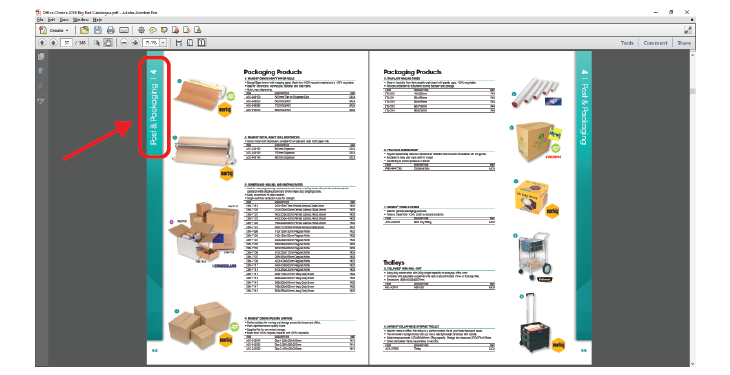
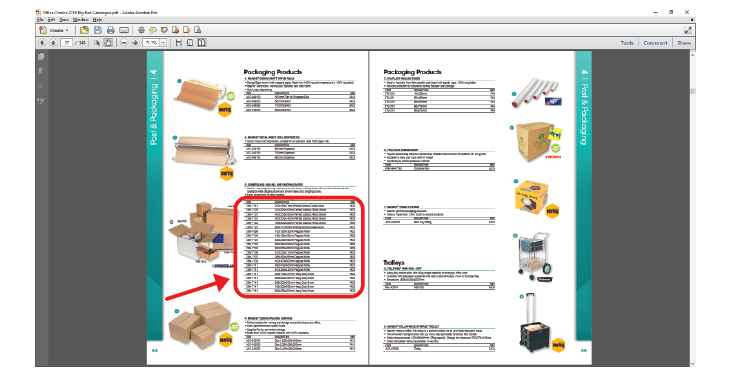
Product Grouping
With Pagination, it’s easy to group products by categories, subcategories, product name, image, and so on. Let us know your document’s structure and logic, and we will apply them consistently.
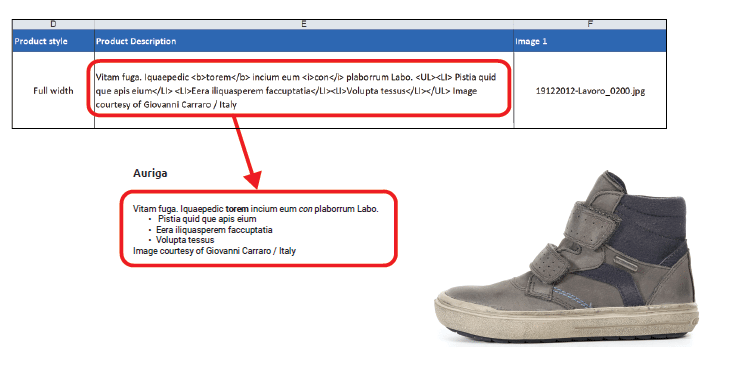
Multiple Paragraphs and Character Styles (HTML tags)
If you want to emphasize a single word or sentence using, for instance, bold, italics, or a bulleted list, you can change text formatting using HTML tags directly in your data sheet.
Asset Management
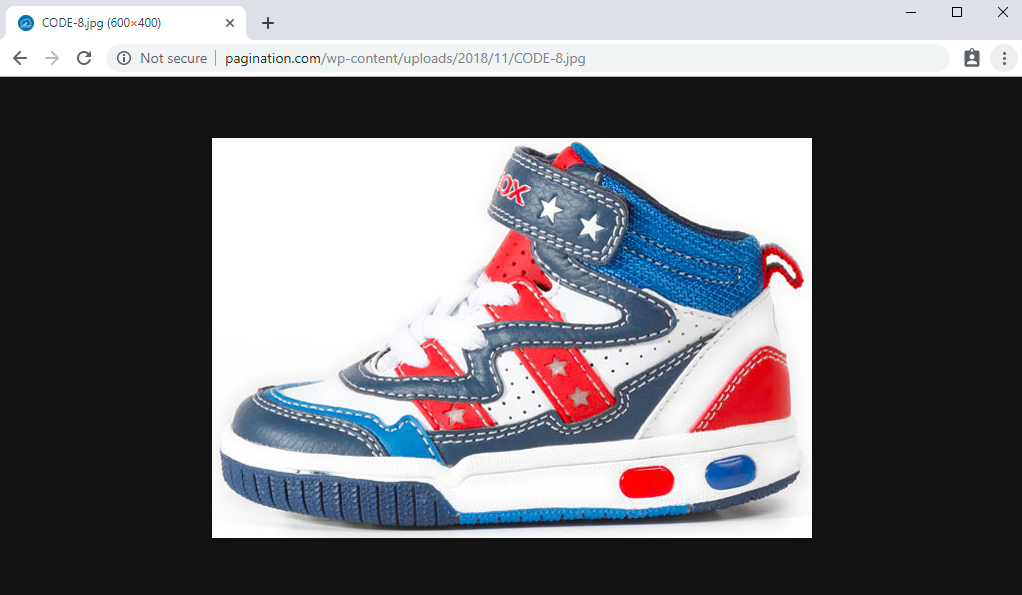
The price includes uploading the assets to our platform. There is also the option to automatically download assets using public URL links. The URLs must be entered into the data files.
E.g. https://pagination.com/wp-content/uploads/2018/11/CODE-8.jpg
The cost is $700 year, 650€/ year, or £550/year and must be added to the cost of the Professional Edition.
Featured in the Business Edition
Your InDesign file
We can automate your Adobe InDesign layout as it is.
- If you don’t have an InDesign layout, don’t worry! We can create one according to your needs.
ONE-OFF PRICE
Creation of an InDesign template $900 / €750/ £700 (8 hrs).
Subsequent amendments will be charged: $70/hr – €60/hr – £55/hr.
Creation of the Cover $350 / €300 / £250 (5 hrs) for 1/2/3 drafts.
Subsequent amendments will be charged: $70/hr – €60/hr – £55/hr.
- If you are planning to create a new layout (different from the one you are currently using), we suggest that you schedule a quick call with our layout managers to get advice on the best way to do it.
- If automation is not possible, we can propose a new layout in order to achieve the complete automation of your document.
Your data file
You can connect your InDesign templates to an ever-increasing pool of business applications (SAP, Magento, Prestashop, Oracle, Salesforce, and more). You can easily export common data files such as Excel, TXT, CSV, SQL, or XML. If you don’t have a data file that includes all of your product information, we can help you to create one.
Up to 4000 SKUs
The data file (Excel / CSV) must contain up to 4000 SKUs (4001 rows of a spreadsheet).
Up to 1000 Images/Assets
Upload up to 1000 images using common formats such as JPEG, JPG, TIFF, PNG, and GIF and files such as AI, EPS, PSD, INDD, IDML, PDF, etc., to create your document automatically.
1 User
The service can be used by one (1) user.
Up to 20 Fields
Describe your products with all the information (categories, groups, attributes, prices, etc.) they need (up to 20 fields).
Output files: PDF/InDesign
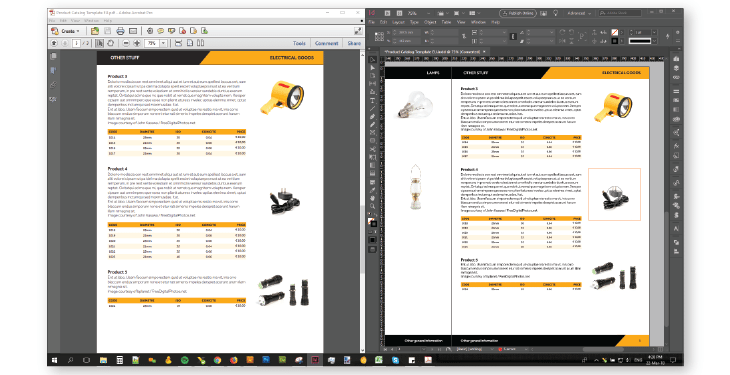
Create your documents in PDF and InDesign format:
- PDF
- High-quality and ready-to-print (high-res images – 300dpi)
- Lightweight version for agile web publishing (low-res images – 72dpi).
- Custom color profiles
- InDesign
- INDD
- IDML
- Package with links and fonts
Classic Table of Contents
You can automatically create your clickable TOC with hyperlinks that reach the relevant sections of the document in no time.
Basic Cover Merging
Pagination enables you to integrate your hand-crafted covers (one cover and one back cover) creating perfect documents always up-to-date and effective. You can use the InDesign Book feature to easily integrate your files by uploading them to the Pagination cloud.
Access via web browser
Since Pagination is a cloud-based solution, you need an internet connection to use it. You can log in from your favorite browser easily (Chrome, Firefox, Edge/Internet Explorer, Safari, Opera, etc.)
Customer service
You can contact Pagination Support for any issue at support@pagination.com. Our Support Team is also reachable by phone at the following times:
MON-FRI
9:00 AM – 1:00 PM CET/CEST
2:00 PM – 6:00 PM CET/CEST
Basic multilingual
You can change the language of your product information and your document will be created in your preferred language.
One simple product layout
You can use a simple product layout for your products.

Page/chapter separators
We can automatically insert a page separator (with a chapter TOC) or an advertisement page whenever necessary.
Unlimited documents (24/7)
With our platform, you can create and manage documents anytime, anywhere, and from any device — without installing any software. Enjoy unparalleled flexibility and efficiency for all your publishing needs.
- Key Benefits:
Unlimited Versions – Generate as many document variations as needed using the same template, ensuring consistency and adaptability.
- Scalable to Your Needs
Depending on your project requirements, you could benefit from:- High Volume Capability – Generate up to 5,000 pages per month, perfect for handling extensive publishing needs with ease.
- Parallel Processing – Create up to 400 documents simultaneously, optimizing workflows and boosting productivity.
If your requirements are higher, contact us to explore all available options and find the perfect solution for your needs!

Email Notification System
Pagination provides an email notification system that informs you of the most relevant events related to the document you are creating. You will receive a message when:
- The pagination process starts
- The pagination process ends and your documents are ready to be downloaded
- If there are any errors in the pagination process
Dynamic Category Changes
When there is a category change, show the new category in the header of the page, or in your preferred position. Pagination enables you to do this automatically using master pages with dynamic data. With large documents, it is useful for the reader to skim the categories written in the page header. This also gives a feeling of ‘bread crumbing’ to keep track of their location within the document. Letting InDesign do this automatically is a big timesaver when editing a document.
Product Grouping
With Pagination, it’s easy to group products by categories, subcategories, product name, image, and so on. Let us know your document’s structure and logic, and we will apply them consistently.
Multiple Paragraphs and Character Styles (HTML tags)
If you want to emphasize a single word or sentence using, for instance, bold, italics, or a bulleted list, you can change text formatting using HTML tags directly in your data sheet.
Auto Breaks
When there is a change in a spreadsheet, an automatic publishing flow interruption can be associated with it:
- Product break at your preferred change
A new product begins when, for example, the product name is changed - Category break at category change
Insert a page break when a category is changed - Document break at your preferred break (InDesign book feature)
Automatically split your document into many sections (e.g., chapters) and create an InDesign Book file (INDB) to give you more editing flexibility.
Simplified Attribute Management
Each product is defined by its attributes. Attributes can be anything that describes the products, like their measure, weight, color, voltage, and so on. If your attributes assortment is huge, the overall number of attributes you need to manage presents a challenge. You can solve this problem with two approaches:
- Flexible product layouts and dynamic tables
Your layout adapts to the attributes inserted in your data. If an attribute is not presented, the missing space in the layout is reassigned, and the page layout readapted. The same thing happens in the dynamic table; that is, if a table attribute is not stored in your data, the related column will not be published in the document, and the missing space will be automatically reassigned. - Flexible types (only available for specially made data sheets)
In your spreadsheet, each table attribute is split into two columns, such as LabelAttribute and Attribute. The LabelAttribute will define the header of the column in the document, and the Attribute will define the related attribute. The same is true for the flexible product layout. If an attribute is not presented, the missing space in the layout is reassigned.
Magic Tables
- Table header (continued) and product images on a new page
If a table will not be completed on a single page, Pagination will publish the remaining table data in the next page, repeating the table header and the main product image(s). - Adaptive columns
Increase the width of the column to a minimum required space, avoiding line breaks inside the cell. If more space is available to expand the table to fill the margin of the page, the available space is evenly distributed among all the columns. This feature gives flexibility to columns that contain long descriptions in the header or in the body. - Table rows keep rules
Set every new table to start with a minimum of (your preferred number) rows. - Dynamic table notes
Create custom table notes for each product table automatically.
Automatic Barcode and QR Code Generation
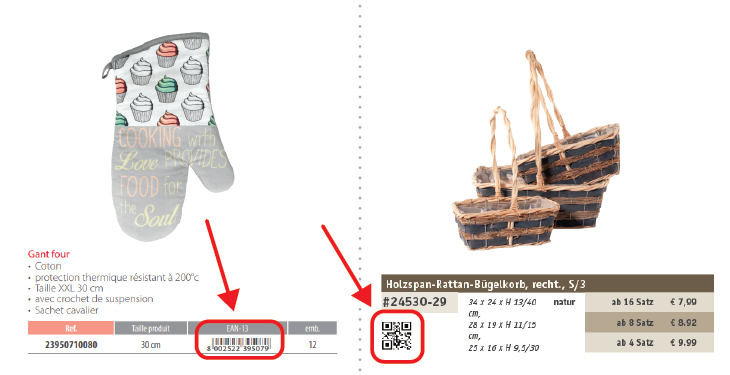
Generate barcodes and QR codes automatically by taking the content to be inserted from the data sheet as EAN code, URL, and so on.
URL Links
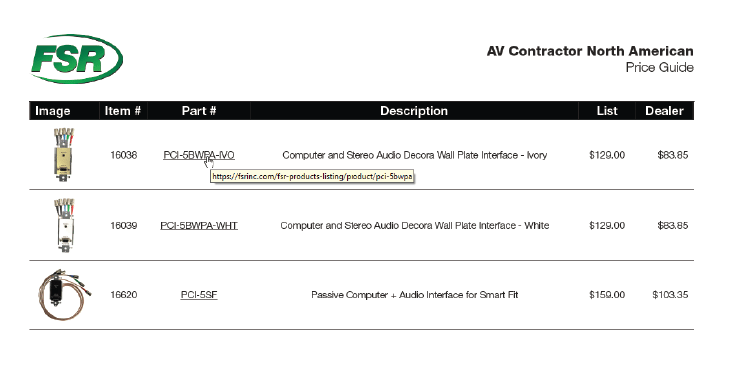
Insert URL links in your document automatically.
Featured in the Enterprise Edition
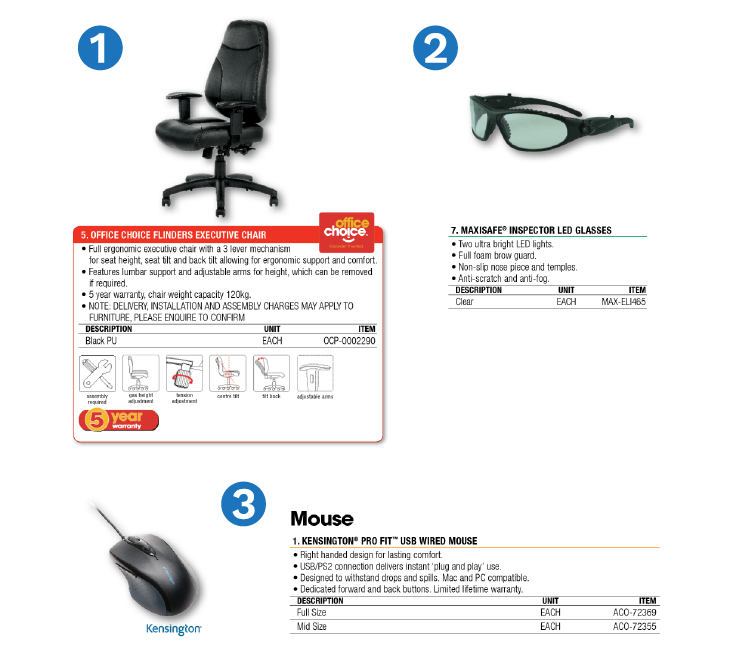
Multiple Product layouts
A product layout is the grouping of the elements (product image, product name, description, price, etc.) on a page. Assign different product layouts to different kinds of products to easily handle and customize the design of your document.
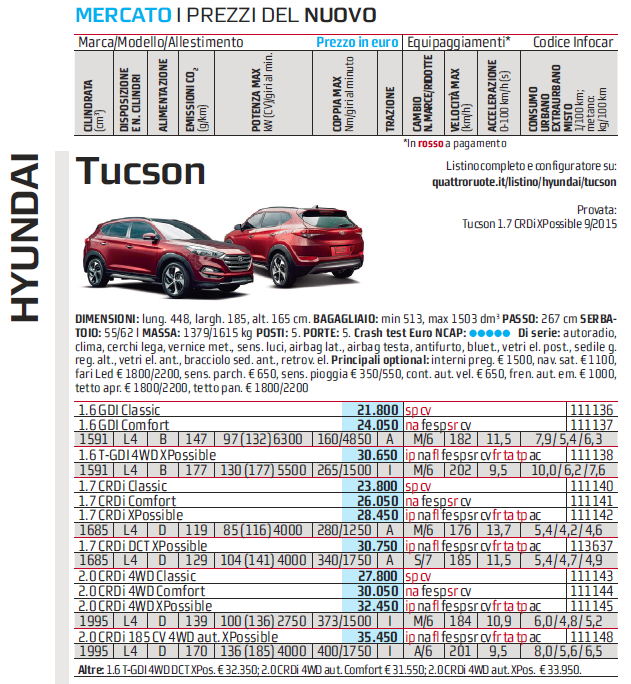
Complex Product Layouts
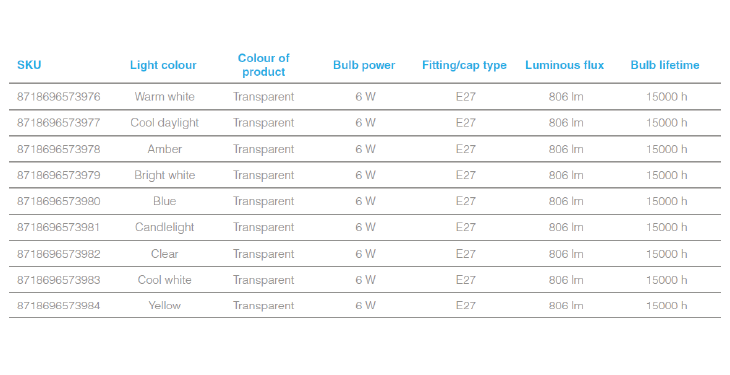
Complex product layout means a product layout that includes more than 15 attributes. The following table is a good example of what we mean.
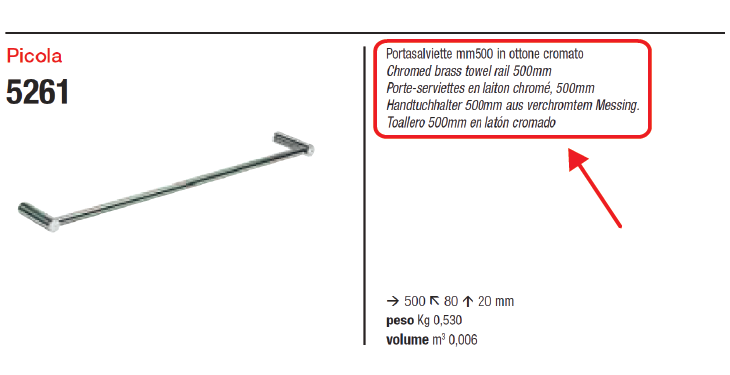
Advanced multilingual
With Pagination, it is easy to create documents in different languages, simply handling your translations from your data sheet. You can manage them in different ways, such as:
- Translations Fields
(for business application export)
They contain the information in all the languages you need. This solution is used in a centralized management process, where all the translations are inserted in only one data file. - Labels
(for both business application export and specially made data sheets)
Use labels that indicate the translations in a separate data sheet. - Adding a Translation Header Row
(only available for specially made data sheets)
Add a translation header row in your specially made data sheet and fill it with the header fields’ translations. This solution helps you to manage the different languages in your data while avoiding the creation of complex spreadsheets. It is used in decentralized management, where each branch uses its own language.
Using one of these multi-language features, you will independently be able to create:
- One multilingual document
The document includes all the translations you need, one beneath the other, side by side, and so on. - Different documents, one for each language
Create all the parts of your document with each language you need.
Multiple users
The service can be used by all users who need it.
Unlimited fields
You can use unlimited fields to describe your products.
Unlimited images/assets
You can upload all the images you need using common formats such as JPEG, JPG, TIFF, PNG, and GIF. You can also upload different files such as AI, EPS, PSD, INDD, IDML, PDF, etc., to create your document automatically.
Advanced Cover Merging
Pagination enables you to integrate your hand-crafted covers (unlimited covers and back covers) creating perfect documents always up-to-date and effective. You can use the InDesign Book feature to easily integrate your files by uploading them to the Pagination cloud.
Image URL
If the product information is stored on Cloud software (E-commerce, PIM, DAM, etc.), you can export it to a spreadsheet such as Excel, CSV, TXT file, and so on. This data file includes all the fields that describe your items. Images come out as URLs. E.g. https://pagination.com/wp-content/uploads/2018/11/CODE-8.jpg
Pagination can use the image URL to automatically create InDesign and PDF files.
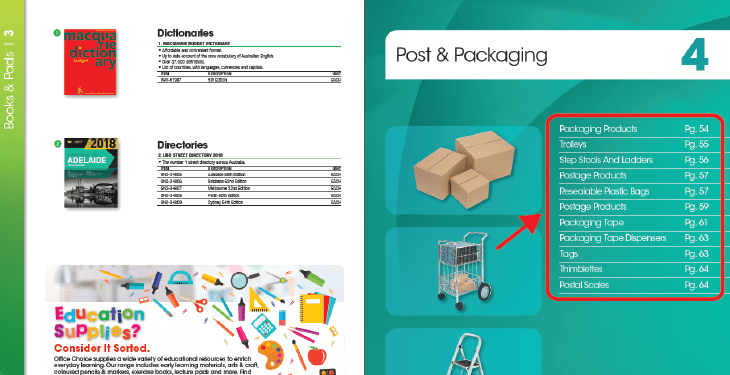
Different types of TOCs
You can automatically create:
- A clickable TOC with hyperlinks that reach the relevant sections of the document in no time;
- A TOC with custom content ordering, using the order of appearance of the articles in the spreadsheet, or select the content order manually;
- A Chapter-separating TOC that introduces every chapter;
- Different types of TOCs
Create different TOCs with the sorting you prefer:
– Classic sort order (page number sort order)
– Photographic TOC
– Alphabetical order (by category, by product, by what you want)
Multiple Data Sheet Relationship (Data Integration)
Sometimes, a single data sheet is not enough to contain the complexity of your data structure; sometimes you just need two. For example, you may need a data sheet with the list and description of parent products and another data sheet with the spare parts associated with them. Pagination can integrate your multiple data sheets into a seamless workflow.
Merge Automatic and Crafted Documents
For some of your documents, the content may have to be professionally hand-crafted to deliver maximum impact and meaning. Pagination enables you to integrate your hand-crafted content into a seamless workflow, resulting in ready-to-use final documents that are always up-to-date and effective. You can use the InDesign Book feature to integrate:
- Introduction and final pages
- ADV images
- Any other static pages in the selected position

Multiple Product Relationships
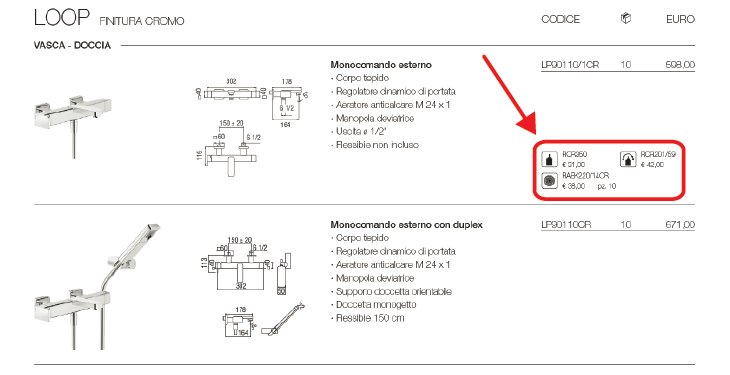
Pagination handles all the relationship among your products, like accessories and related products, and makes their management and publishing easier.
Legacy app integration
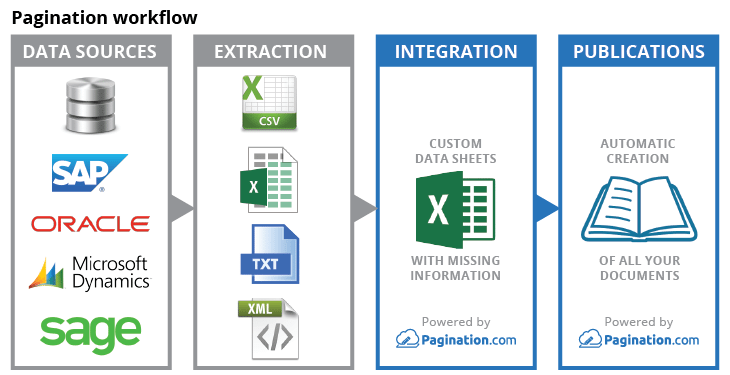
Pagination easily integrates with the exports of your legacy apps.
Access via API
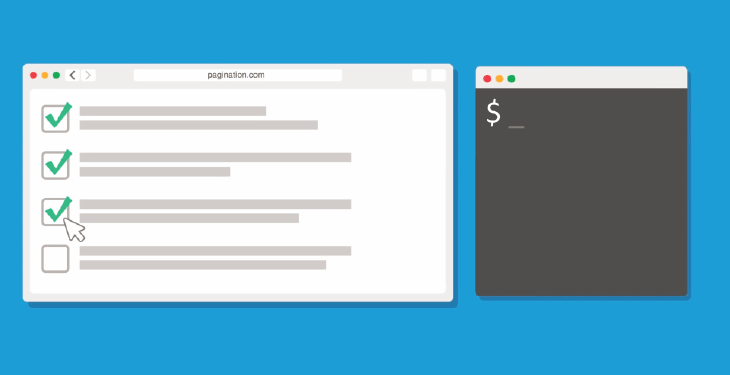
You usually manage your paginations manually in the safe area (Pagination Custom Cloud) of our web interface. With API CLI, you can choose to start the pagination process at a scheduled time, or with a scheduled task, directly syncing data and images with your business applications and updating your documents.
Service Level Agreements (SLA)
We offer on-demand SLA packages to suit your company’s requirements.

Throughput: scalable
Pagination starting throughput is around 40 pages per minute and it can scale up to 400 pages per minute.
Custom PDF export profiles
You can create your documents using your custom PDF export profiles.
Multipricing
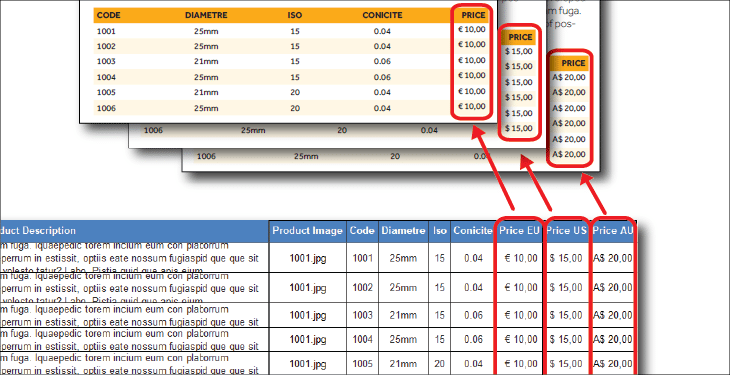
You may need to create different versions of your documents that differ for the prices, discounts, or currencies, or perhaps you want to sell only certain products in a particular market, or to a particular customer. Pagination uses your data sheets’ information to automatically create all the different versions needed.
Dynamic Legends/Notes in the Page Footer
In the page footers, it might be useful to insert product information such as notes or a legend of the symbols used to best describe your products. Pagination creates dynamic legends or notes automatically, a different one for each page, taking into account only the product information displayed on that page.
Handling Large Datasets
Pagination’s processing times grow proportionately and independently of the data amount, and you can split the creation of large documents into multiple parallel instances.
Vertical Table Justification
When table breaks are enforced, and rows keep rules are applied, each final table of a page could end at a different height. This is not a problem for many projects, but if a project requires the equal ending of its tables, you can obtain what we call a “vertical table justification.” It works automatically by measuring the gap between the last table and the end of the frame and then spreads the difference among all the table rows on the pages.
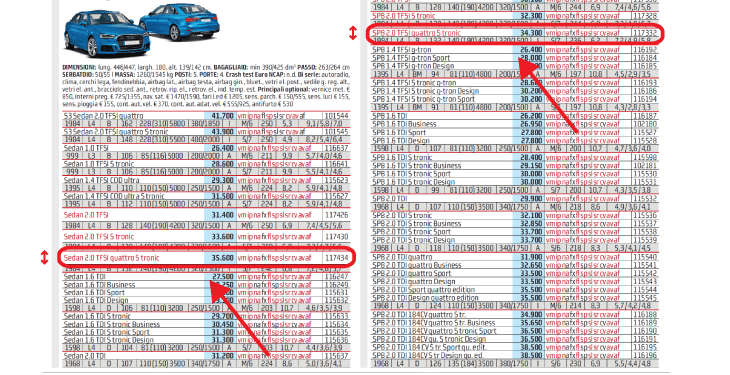
Predefined Number of Final Pages
Due to technical and financial considerations, large documents can be printed in page groups of 8, 16, or 32. As a result, these documents could have pages left blank; sometimes, readers might suspect that the blank pages are due to a printing error. To avoid this problem, blank pages can carry a notice such as, “This page is intentionally left blank.” Alternatively, you can imperceptibly and smoothly stretch or compress table rows to fill the document with the exact number of pages.
Export Image Scale %
In a project, the size of the images could be a narrow balance of proportionality between products close to one other and the need to express the product details with the best (or biggest) presentation of the images. If this balance is very important for the project, you usually have to scale the images one by one, by hand, page after page.
Instead, with our Export Image Scale tool, the scale percentage set in InDesign goes back to the data sheet, so the scale can be used to paginate different assortments of the catalog, or set the proportion for other publications, like a website.
Single Sign-On Authentication
Allow your team to access Pagination using your organization’s existing identity provider. With Single Sign-On (SSO), employees can log in using their corporate credentials, eliminating the need for separate usernames and passwords. Centralized authentication simplifies user management, reduces administrative overhead, strengthens security, and helps ensure that only authorized, active employees can access your Pagination workspace.
Automated User Lifecycle Management (SCIM)
Automate user provisioning and deprovisioning with SCIM (System for Cross-domain Identity Management). User accounts are automatically created, updated, or removed in Pagination whenever changes occur in your identity provider. This eliminates manual account administration, helps prevent unauthorized access from former employees, and ensures your user directory stays synchronized as your organization grows or changes.