






Pagination Price List Software

Generate print-ready InDesign and PDF price lists straight from the prices in your ERP, PIM or Excel file. Every currency, language and customer edition is rebuilt in one run each time your prices change, with no copy-paste and no manual re-layout.


How Pagination Builds Your Price Lists

Set it up once. After that, every price update is a new run, not a new layout job.

icon__custom-layout
1

Connect Your Prices

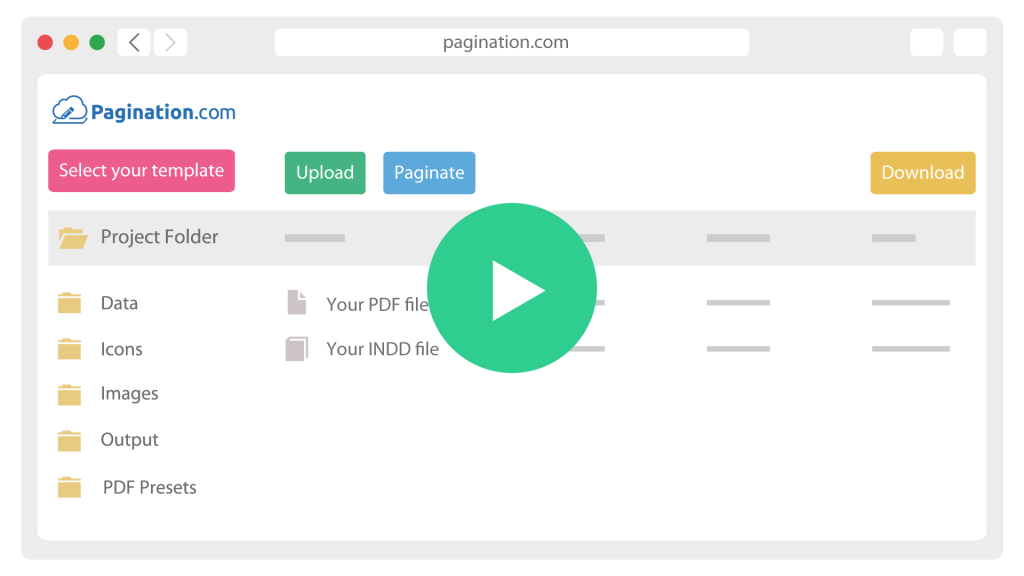
Upload an Excel or CSV export, or connect your ERP or PIM. Prices stay in the system where you already manage them.

icon__upload-data
2

Load Your Price List Layout

Use your own InDesign price list or start from one of our free templates. Fields and pricing rules are mapped once, then reused on every update.

icon__paginate-document
3

Generate The Price List

Price tables, currencies, discounts, validity dates, table of contents and cover data placed automatically for each edition.

icon__download-files
4

Send It Out

Print-ready PDF and native InDesign files, ready for dealers, sales teams and customers.

multilingual icon

Price Lists for Every Market and Currency

One price database, one InDesign template, every market edition. 

Pagination applies market prices, currency formats, VAT notes and terms and conditions by rule, so each edition is correct by construction. No duplicated files, no edit repeated country by country.

Prices You Don't Have to Double-Check

When a price travels from ERP to spreadsheet to InDesign by hand, one wrong digit can reach every distributor. With Pagination, prices and product codes are placed directly from your source data. 

Accuracy moves to the source: FAAC generates its price catalog from SAP exports. Weeks of manual price checking became a confirmation check, and cross-references and page numbers are now generated automatically.

One price list workflow for every subsidiary

Dormakaba started by automating the price list of its UK branch, and France, Spain and Italy followed within months.

Today its subsidiaries across Europe publish their price lists from one master data file and shared templates, with Excel uploads and Akeneo PIM data feeding the same Pagination workflow

Inside Pagination Price List Software: Built for Recurring Price Updates

Production features for teams that publish new prices every month, quarter or season:

Automatic price sync

List prices, discounts and product data pulled from your ERP, PIM or Excel on every run.

Quantity breaks and promotions

Break-point prices, promotional prices and validity notes rendered from your data, not typed into tables.

Market and customer editions

Different assortments, currencies, VAT settings, languages and terms from the same template.

Currency and number formats

Currency symbols, decimal and thousand separators set per market.

Validity dates on every edition

Currency, VAT basis and validity period printed on the cover automatically.

Table of contents and static pages

Contents generated for each edition, with terms and conditions and order pages added automatically.

Scheduled generation

Price lists produced overnight via API, ready when your team starts the day.

Full API access

Trigger a new price list from your ERP, PIM or release workflow.

Cloud based

AWS EU infrastructure, GDPR compliant.

Connect the System Where Your Prices Live

Pagination reads prices from any source that exposes an API or a structured export, including a plain Excel or CSV file. Native connectors are ready out of the box for the systems below, and a custom integration can be built for anything else.

PIM
Akeneo
Pimcore
Salsify
Plytix
inRiver
ERP
SAP
Epicor
NetSuite
Infor
Oracle
ECOMMERCE
Shopify
Magento
WooCommerce
DAM
Bynder
Cloudinary

Frequently Asked Questions

What teams ask before automating their price lists. Question not listed here? Ask our team.

Yes. Market editions share one template and one price source, with prices, currency formats, VAT notes and terms applied by rule. 

Excel works. Kramer generates its monthly 1,250-SKU price list from an Excel export, and the same workflow can read from an ERP or PIM when you have one.

Yes. Generation can be triggered via API on a schedule, so the files are ready in the morning, as Kate & Kon does for its Austrian, German and export price lists.

You update the prices in the source data and run the generation again. Layout and structure stay as they are, and every edition picks up the new prices.

Automate Your Next
Price List with Pagination

Share a recent price list and the Excel or ERP export behind it.
We’ll show you what can be automated and what your first generated edition will look like.